
Astrocartography tools help you find planetary lines, understand a city, or compare destinations. Start with a map for one place; use a comparison when you have two or more candidates. Try your own map with AstroCarto below, or use the selection table to find a calculator, report, or guide for your question.
YOUR QUESTION. YOUR MAP. YOUR NEXT STEP.
Astrocartography Tools
See what your map says about one city
Enter your birth details, then select a city to explore its available planetary signals, angles, distances, and life themes. Basic previews have a limited allowance; advanced features have separate access requirements.
Choose the output before choosing the tool
The useful starting point for astrocartography tools is a question with a recognizable answer. “Show me my lines” needs a map. “What does this place emphasize?” needs a city interpretation with supporting evidence. “Which of these two places fits my work plans?” needs a comparison under the same goal. These questions can share birth details while requiring different outputs.
For a first exploration, astrocartography tools should let you connect a planetary label to an actual location. A beautiful globe is easier to use when you can identify the selected point, the line involved, and the information behind an explanation. You should be able to describe what you learned without depending on the color of the line alone.
| Your question | Useful output | What to look for | Where to start |
|---|---|---|---|
| Where are my planetary lines? | Personal world map | Birth inputs, planet names, and angle labels | Create your map here |
| What might this city emphasize? | Location reading | Selected place, visible signals, and the reasoning behind the answer | Generate your map, then select a city |
| Which candidate fits one goal? | City comparison | The same person, the same goal, and comparable evidence for each city | Create your map, then open Compare Cities in the results |
| How do my houses change there? | Relocated chart | Destination coordinates and a chart calculated for the same birth moment | Open the relocation chart calculator |
| How do several life themes fit together? | Personal report | Scope, supporting evidence, trade-offs, and questions left open | Explore the personal report |
These outputs can work together: a map locates a line, while a specialized chart lets you investigate houses. Choose astrocartography tools by that difference. If you already have a product in mind, jump to the map and location guides or AstroCarto comparisons to explore its specific use case.
Before browsing astrocartography tools, finish this sentence: “By the end of this session, I want to know ___.” Keep the answer narrow enough to recognize. For example, identifying the line near Valencia is a reasonable first outcome. Deciding every aspect of a future move requires more information than one map can supply.
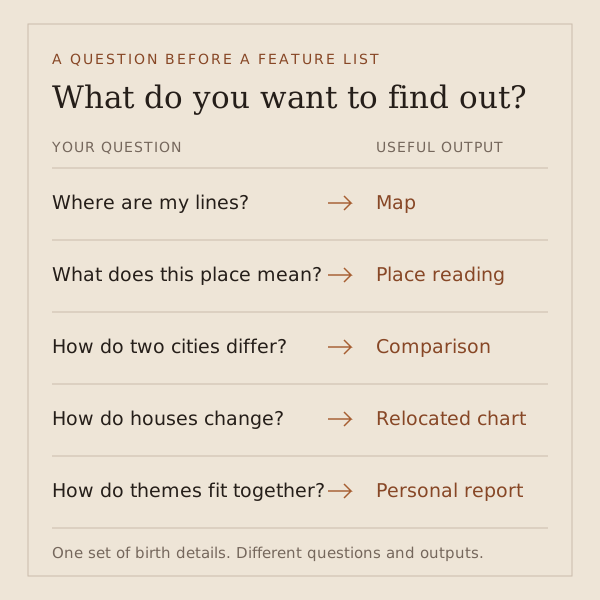
What different astrocartography tools actually help you do
Generate a map and inspect a place
Map-focused astrocartography tools are useful when geography is the missing piece. Start with your birth date, recorded birth time, and birthplace. After generation, choose a familiar city or a destination you are considering. Read its location and the available planetary labels before deciding whether a line seems relevant.
In AstroCarto, select a city and look for Start with the answer. Read the available life theme, then inspect the supporting planet, angle, and distance where shown. That connects a mark on the map to a question about work, relationships, or home. Begin with the basic preview; the result shows the access needed to explore further.
When evaluating astrocartography tools, separate finding a place from interpreting it. A search box can solve the first task while leaving you with only a label. A location explanation becomes more useful when it connects that label to a theme and lets you inspect the evidence. Our map-reading guide explains that next step.
Compare places under one goal
Comparison-oriented astrocartography tools become relevant once you have a shortlist. In AstroCarto, Compare Cities works with two to four places. Keep one goal consistent across the comparison so that you can understand a difference in emphasis. Comparing a career result for one city with a home result for another changes the question midway.
A useful comparison explains both support and tension. If one destination appears stronger for your chosen goal, inspect why. A short ranking is only a starting point: it should lead back to the evidence and the practical trade-off. Among astrocartography tools, this is a meaningful distinction between displaying several places and explaining a choice among them.
Investigate houses or a broader report
Some astrocartography tools answer a more specialized chart question. A relocated chart keeps the birth moment and uses another location to examine the chart from that place. A planetary-line map is a geographic view. Use the relocation chart calculator when changes to houses and angles are your actual question.
Reports serve a different need again: they organize a larger body of interpretation into something you can revisit. Before choosing report-based astrocartography tools, check whether the deliverable concerns one city, a city comparison, or a wider personal assessment. AstroCarto has distinct comparison and personal-report workflows; their access requirements and scope should be considered separately.
When two results disagree, check what each one describes
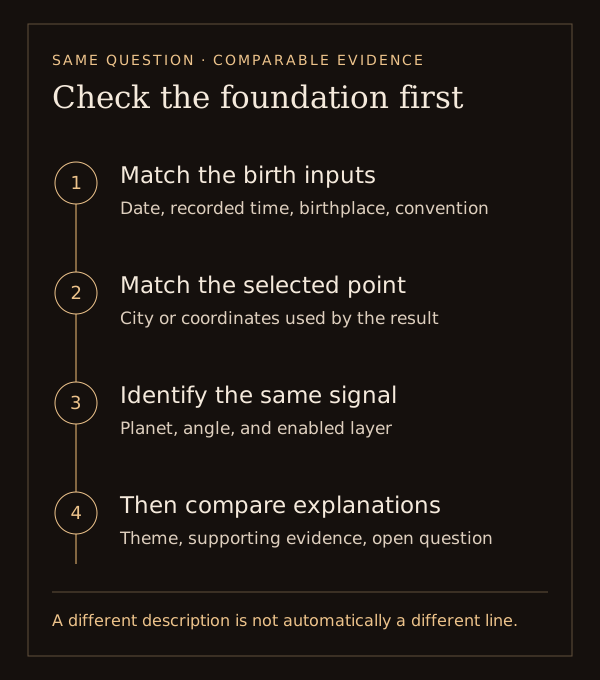
Use this check when a discrepancy interrupts your choice of astrocartography tools. First identify what differs: the location of a line, the selected place, or the wording of its explanation. Each points to a different check; a longer reading will not resolve a mismatched input.
- Match birth inputs. Check the date format, birthplace, and recorded local time. If a service requests a time zone, follow its convention without applying a second adjustment.
- Match the selected point. A click outside Valencia and a search result at its center may refer to different coordinates.
- Match the signal. Compare planet and angle, not color. Check AC/ASC and DC/DSC labels, and distinguish ordinary lines from parans or aspects.
- Separate geometry from interpretation. Two astrocartography tools may describe similar evidence differently. Different adjectives do not establish a calculation error.
If the inputs or layers differ, correct that mismatch before judging the output. If comparable results still disagree, keep the question unresolved rather than purchasing a more confident explanation. This check supports your selection of astrocartography tools; it does not independently establish which calculation is correct.
One city reading already, two destinations still undecided
Consider a Leeds-based traveler choosing astrocartography tools for a six-week working stay. Valencia and Ljubljana are both realistic options. Imagine they have already generated a map, selected Valencia, and read its available explanation. They can identify the displayed line labels, but they still have no common comparison of the two destinations. This is an illustrative tool-choice record, not a calculated verdict for either city.
Before opening more astrocartography tools, the traveler takes stock of the information already available. The missing item is a comparison, not another introduction to Valencia:
| Decision record | What the traveler writes |
|---|---|
| Question | How do Valencia and Ljubljana compare under the same work goal? |
| Already available | A personal map and an accessible Valencia location reading |
| Still missing | Both candidates evaluated for the same person and goal |
| Useful next result | Differences in support and caution, with reasons that can be inspected |
That record changes how the traveler evaluates astrocartography tools. A richer description may be interesting without filling the gap. They consider four possible next steps:
| Next output | What it adds | Does it answer the missing question? |
|---|---|---|
| Another world map | A second view of the geographical lines | Not by itself; it may help investigate a calculation discrepancy |
| A longer Valencia reading | More interpretation of the first candidate | Not by itself; Ljubljana remains unevaluated |
| A comparison of both cities | A common goal and evidence framework for the two candidates | Yes, if the output explains the differences and unresolved trade-offs |
| A broader personal report | An assessment across several life themes | Relevant when that wider scope becomes part of the question |
The choice is Compare Cities. In AstroCarto, the traveler can use the generated map’s result area to compare the two places under one goal. The reason is the missing side-by-side assessment, not a promise that one city will win. Among astrocartography tools, a second single-city reading could also support a manual comparison, but the traveler would need to reconcile its goal, scope, and evidence with the first one.
When would that choice change? If Ljubljana is ruled out by the travel dates, the two-city question disappears. If the traveler only wanted to identify a line and has done so, the map is enough. If home and relationships become equally important, the scope of a personal report deserves a fresh look. Choosing astrocartography tools should follow those changes in the question.
The completed note is short: “I already have Valencia’s map and location reading. I need both cities assessed for the same work goal, so my next step is Compare Cities. I will inspect the reasons and cautions before deciding whether anything else is missing.” It records a tool choice without inventing line distances or a preferred destination.
Try this with your own city. Generate your map and inspect one location, or return to the map already above. Name the unanswered question before opening another output. Use the same decision record to choose which astrocartography tools would add useful information next.
Check whether the next output filled the gap
The next result should answer the question that justified opening it. In the example, a useful comparison covers both cities under one work goal. A longer explanation of Valencia alone does not complete that task. Assess astrocartography tools by what you can now compare, rather than by the length of the new text.
Read the reasons alongside the outcome. Can you identify the support and cautions associated with each candidate? Can you tell which difference matters for the selected goal? Astrocartography tools can make that contrast clearer without settling every practical detail. A location assessment does not establish whether a room has reliable internet or whether travel dates work.
If you use AI to explore the comparison, keep your question attached to the results you actually have: “Which difference matters for the work goal, and what caution should stay beside that conclusion?” Ask for clarification of available evidence rather than a new winner unsupported by it. AI features in astrocartography tools have their own access and context requirements.
A mixed comparison can still complete the task: you may understand why each city has a different trade-off. An unavailable comparison cannot. If one candidate is absent or the relevant result is restricted, mark the comparison as unfinished; do not treat missing information as a negative verdict. Useful astrocartography tools help you see the distinction between an answer that needs judgment and an answer you have not obtained.
Decide what is worth paying for
Free access is useful when it completes your current task. A basic map can establish where a line runs; a preview can show how a location reading is organized. Evaluate paid astrocartography tools by the additional output they provide, not by the number of adjectives in the offer. Identify the question that remains after your first check.
If your difficulty is comparing two plausible cities, a broader collection of generic planet meanings may not help. If you want a persistent assessment across life themes, another map screenshot may be insufficient. The relevant difference between astrocartography tools is the work each output lets you complete: locate, interpret, compare, or review a structured assessment.
Check the delivery and access details before continuing. Is the result a web view, a downloadable document, or a consultation? Does access cover this report, repeated use, or a separate allowance? These are questions to verify for the specific offer. This directory does not imply that all listed astrocartography tools share the same pricing, format, or free tier.
For the traveler above, a longer Valencia report and a two-city comparison are different purchases. Before paying for astrocartography tools, identify whether the offer includes both candidates, the relevant goal, and reasons behind the result. An offer that adds detail to only one city may be useful later, but it should not be mistaken for the comparison they currently need. Check the actual scope shown before continuing.
Buying access should change what you can inspect or understand. If the required evidence is already available, spend time interpreting it. If birth details are uncertain, clarify those limits first. Astrocartography tools can organize exploration, while the affordability and practical feasibility of a trip still need ordinary research.
Use the directory to continue the right question
The directory below connects you to guides on astrocartography tools, related software, and astrology services. Each entry opens a page on this site. The group labels describe the subject of the guide; not every listed brand offers a location map.
Start with map and location guides when you know a tool name or want to understand a particular map. Choose software and developer guides for installation or integration questions. Related astrology and reading guides explain adjacent services. These categories keep your search for astrocartography tools focused on the output you need.
Use the side-by-side comparisons to evaluate astrocartography tools when you have a specific alternative in mind. Look for the task you want to complete and the evidence behind each comparison. Product-specific details belong in the relevant guide.
Spanish and Russian guides have their language stated in each label. You can browse a familiar product first, or test the astrocartography tools on this page with your own city before comparing alternatives.
50 guides & comparisons
Explore astrocartography tools and brand guides
These links open AstroCarto guides and comparisons. Choose a topic by the question you want to answer; related astrology brands do not all provide the same kind of map.
Questions about choosing astrocartography tools
Which tool should I start with?
Start with the output you need. A personal map is appropriate for finding lines; a city reading adds interpretation; a comparison helps when you have alternatives. Try the map above with a place you know. Then evaluate other astrocartography tools against that same task, keeping your birth details and selected location consistent.
Are free astrocartography tools enough?
They may be enough to generate a map or explore a limited reading. What matters is whether the available result answers your question. AstroCarto has basic previews within an allowance, with separate requirements for deeper features. Check the specific access shown rather than assuming that a free map includes unlimited readings or every report.
Why do two maps look different?
Check the birth date, time convention, birthplace, selected location, planet, angle, and enabled layers before judging the explanation. Astrocartography tools can present different visualizations of related information. A remaining calculation discrepancy needs investigation; this page cannot establish which output is correct from appearance alone.
Can I use the map without an exact birth time?
Use the unknown-time option when appropriate, and keep that uncertainty attached to the result. Changing the birth time can change angular lines, so precise location claims become less secure. Astrocartography tools cannot recover a missing recorded time merely by generating an appealing interpretation. Avoid treating a guessed time as an exact input.
Is a relocated chart the same as a map?
They are related outputs with different views. A map shows geographical line locations; a relocated chart examines the chart using a destination for the same birth moment. Choose astrocartography tools that provide the output your question requires. Use the dedicated calculator linked above when your question is specifically about relocated houses and angles.
Does a higher city ranking mean I should move there?
It means the comparison favors that place under its selected goal and method, subject to the available evidence. Inspect the explanation and keep conflicting findings. Astrocartography tools do not establish that a job, home, visa, or relationship will work out. Use the result to form better questions about a realistic candidate.
Choose a tool with a question you can test
Start with one place you know. Find its visible evidence, read the available explanation, and decide what you still need before exploring a second city.
Create my map