
AstroCarto vs TimePassages for Astrocartography
Start with AstroCarto if you are choosing where to live or travel and want a city shortlist, clear comparisons, and explanations you can follow up on. It connects your astrocartography map to personal reports and AI questions, helping you decide which places deserve attention and which trade-offs to investigate.
Both AstroCarto and TimePassages offer maps, interpretations, and relocation charts. This comparison covers TimePassages desktop Astro Maps, its interpretation add-on, and related chart tools. AstroCarto organizes location research around your goal, candidate cities, and next questions—the workflow we focus on here.
AstroCarto or TimePassages: which should you pick?
Choose AstroCarto to turn location research into a plan
For choosing between real destinations, we recommend starting with AstroCarto. Suppose you are considering Paris, Berlin, and Lisbon for your career. Compare Cities puts their order, support, and cautions together. The cross-goal matrix helps you check whether a promising career option brings different questions for home life or relationships. A Full AI City Comparison Report explains the evidence and trade-offs, with a PDF to keep.
If you have no shortlist, Find My Best Places returns a ranked shortlist by goal and region, with reasons and trade-offs for each city. A Personal Astrocartography Report brings priority places, city deep dives, and five life themes into a broader assessment. Ask AI about the current result, then continue into shared-place or moving-time research when a partner or a date becomes part of your decision.
Choose TimePassages for desktop chart research
TimePassages fits readers who want to work with house systems, aspects, transits, and multiple chart windows. Astro Maps and its line interpretations connect that chart research to places, while relocated charts let you investigate each destination's angles and houses. If your immediate question is which cities to investigate and what you would gain or give up, start with AstroCarto's goal-based shortlist and comparison workflow.
Features at a glance
Start with the tasks that help you choose and understand places. Compare the output you need: a city shortlist, a chart interpretation, or a file to keep. Product information was checked on October 19, 2026.
| Task or feature | AstroCarto | TimePassages |
|---|---|---|
| Find candidate places | Find My Best Places returns a ranked shortlist of up to ten cities by goal and region, with reasons and trade-offs. | Explore planetary angular lines on a world map and investigate places that interest you. |
| Compare cities around a goal | Compare two to four cities with an ordered result, support, cautions, and a cross-goal matrix. | Study destinations through their relocated charts and use multiple chart windows for comparison. |
| Create a personal location report | Priority places, city deep dives, five life themes, an evidence map, sensitivity checks, and a downloadable PDF. | Generate an interpretation report for a destination's relocated chart. |
| Keep a detailed city comparison | A Full AI City Comparison Report explains the ranking, each city's evidence, trade-offs, and next checks, with PDF export. | Save individual relocated charts and their reports for later review. |
| Ask AI about the results | Ask follow-up questions with calculated map, city-comparison, or completed-report context attached. | Click map lines and chart features to read interpretations. AI follow-up on those results has not been verified. |
| Research places for two people | Discover shared candidates, check one city, or compare up to six cities with each person's support and cautions. | Study two people's charts through comparison bi-wheels, composite charts, and relationship interpretations. Shared-city recommendations have not been verified. |
| Research when to move | Research a chosen city and goal across three, six, or twelve months, with date windows, explanations, and cautions. | Use transits, progressions, and timelines for timing research, including transits to a relocated chart. |
| Read a location in depth | Check City and In-Depth Location Readings explain nearby lines, distances, strengths, and available angle-aspect or Paran signals. | Combine map-line interpretations with a destination's relocated chart, angles, and houses. |
| Explore combined planetary influences | Where Planets Work Together connects planetary combinations to your goal and candidate places. | Use aspect grids and midpoint tools to study planetary relationships within charts. Goal-based place suggestions from these combinations have not been verified. |
| Explore planetary lines | Interactive map with planetary lines, including Venus, Jupiter, Saturn, Pluto, and Lunar Node. | Astro Maps displays AS, DS, MC, and IC lines with multiple zoom levels. |
| Study a relocation chart | A separate calculator compares natal and relocated Whole Sign houses; personal reports also assess relocated-chart evidence. | Create a relocated chart and work with the software's house-system settings. |
| Save a map image | Download an HD map image to save, share, or print. | Save chart-wheel images and report PDFs. Exporting the Astro Maps map itself as an image has not been verified. |
Check City examines one location's nearby signals. A Personal Astrocartography Report takes a wider view of your priority places and life themes, while a Full AI City Comparison Report explains the two to four cities you selected. A relocated-chart report focuses on the chart at one destination. Choose the output that matches the question you are trying to answer.
How AstroCarto and TimePassages differ
Pricing: plans and usage
AstroCarto
Choose Ultimate for the full workflow described here: discover candidates with Find My Best Places, explore their trade-offs in a Full AI City Comparison Report, and continue with AI follow-up. Pro fits readers who want personal reports, in-depth location readings, basic city comparisons, and AI questions about their results.
As of October 19, 2026, Pro is US$19.90 for 5 Personal Astrocartography Reports and 1,500 AI credits. Ultimate is US$39.90 for 20 personal reports and 10,000 AI credits, plus the complete Find My Best Places list, Full AI City Comparison Reports, and saved AI chat history. Both are one-time purchases and include the planetary lines, in-depth location readings, unlimited city checks and basic comparisons, HD maps, shared-city tools, and the full moving-time calendar.
AI questions and full comparison reports use credits; the applicable amount is shown before generation. You can start with a map and limited tool trials. Check the pricing page for current allowances and plan differences.
TimePassages
TimePassages desktop pricing depends on the edition and report add-ons. Standard is US$179, Advanced is US$279, and the Astro Maps Add-on is US$129. Advanced includes map display; the add-on supplies map-line interpretations and can also be used with Standard.
At those listed prices, a new Standard license plus the Astro Maps Add-on totals US$308. For maps, line interpretations, and relocated-chart research together, Advanced plus the add-on totals US$408. Relationship interpretations use separate report add-ons. The US$699 Complete Package bundles Advanced with all report add-ons. These are desktop software purchases; mobile subscriptions, upgrades, and commercial licensing have their own terms. Compare the edition and included outputs you need, with taxes or offers checked at purchase.
Interface: researching the same city
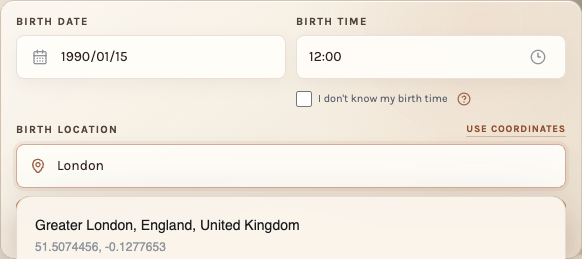
Consider Paris alongside Berlin and Lisbon for your career. Our AstroCarto example uses fictional birth details: January 15, 1990, at 12:00 in London. The useful question is how the workflow helps you understand Paris and weigh it against the other destinations.
AstroCarto
Generate your map, add the three cities to Compare Cities, and select Career & recognition. The result brings their order, supporting signals, and cautions into one view. Use the cross-goal matrix to check other priorities before narrowing your shortlist.
Open a Full AI City Comparison Report for the reasoning behind the result, then ask a follow-up with the comparison context attached. If Lisbon interests you despite mixed signals, ask which findings support it and which cautions deserve attention. Check City and In-Depth Location Readings let you investigate one destination more closely.
TimePassages
Open a natal chart and use Astro Maps to explore the planetary lines around the region. Click a line to read its interpretation with the Astro Maps Add-on. To examine Paris's houses and angles, create a relocated chart for Paris. Other destinations can be studied through their own relocated charts, with multiple chart windows available for reference.
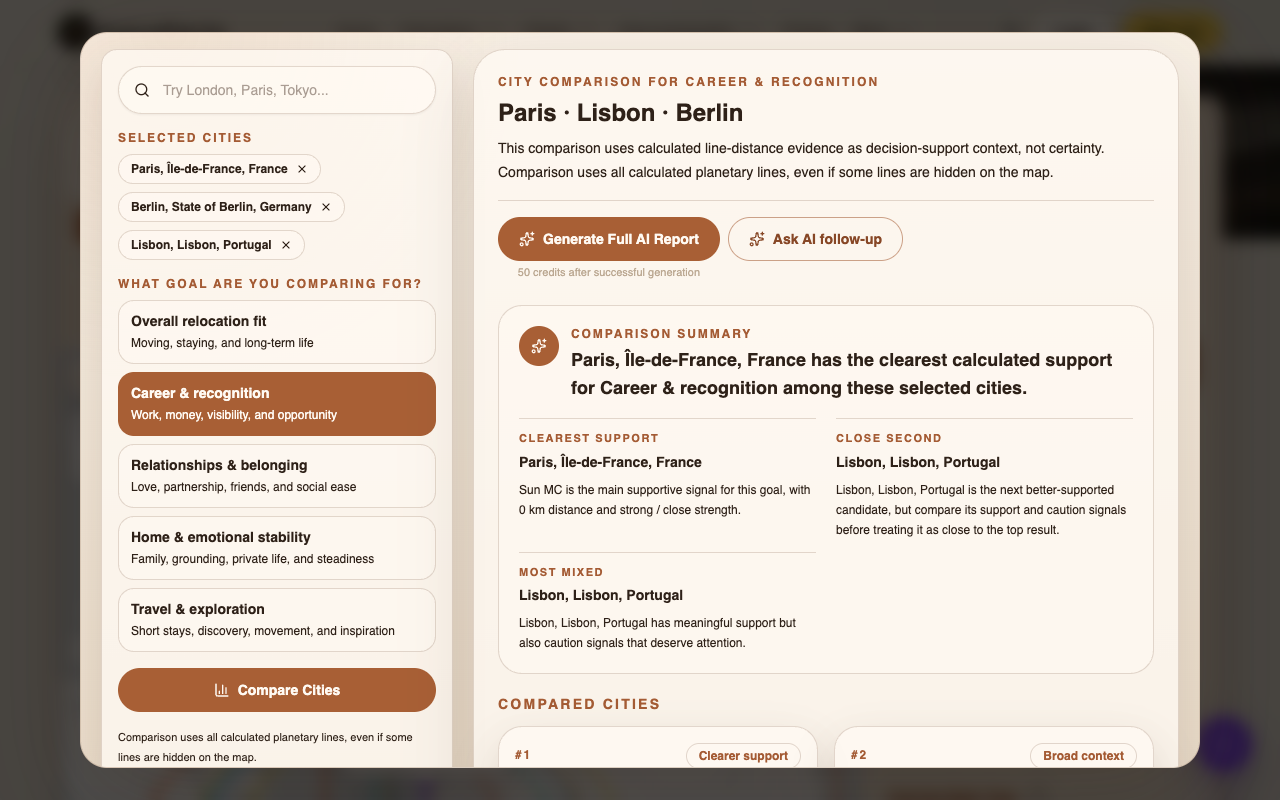
In this AstroCarto example, Paris has the clearest support. Lisbon is both the close second and the most mixed option. A competitive candidate can still raise important questions: which signals support Lisbon, and which complicate the choice? Use the summary to identify those questions, then investigate them in the full comparison report or through AI follow-up. The ranking belongs to these example birth details; create your own map to research your options.
Features: what happens after you find a place?
AstroCarto
Find My Best Places turns a goal and region into a ranked shortlist of up to ten cities, with reasons and trade-offs. Review those findings alongside your practical options, then bring two to four realistic destinations into Compare Cities. A Full AI City Comparison Report explains that shortlist and provides a PDF you can revisit.
A Personal Astrocartography Report answers a broader location question. It brings together priority places, city deep dives, five life themes, an interactive evidence map, and birth-time and house-system sensitivity checks. Keep its PDF for later reference. With the completed report attached, ask AI why a place stands out or how conflicting signals affect its assessment.
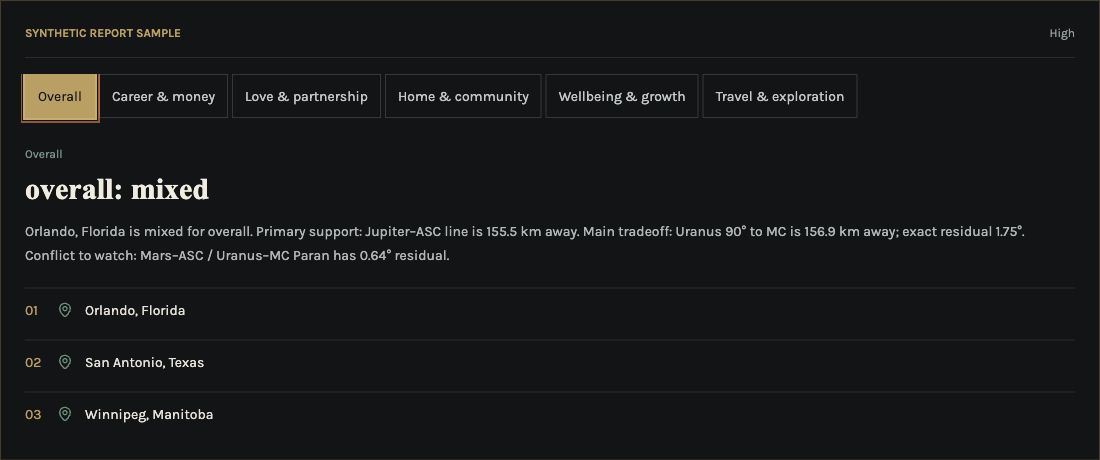
The complete personal report example shows why those explanations matter. Orlando leads the place portfolio, yet its overall assessment is Mixed. Supporting Jupiter ASC evidence appears alongside cautions and conflicts. That gives you specific findings to investigate before settling on a candidate. This is a separate synthetic example from the Paris comparison above.
When another person is involved, Find the Best Places for Two People shows shared support and each person's cautions. Once you have a city in focus, Best Time to Move organizes date windows around that destination and your goal. You can continue from a promising place into the questions about people and timing that affect your plans.
TimePassages
A relocated chart lets you examine the Ascendant, house placements, and angular planets at a destination. You can read chart-feature interpretations, generate a report for the relocated chart, and continue into transits or progressions. Comparison and composite charts provide a separate way to study relationships between two people.
These tools give you material for detailed chart research. To organize a shortlist around one goal and continue asking about its support and cautions, AstroCarto connects the city comparison, full report, and AI follow-up in the same workflow. Start from your own birth details and the destinations you want to investigate.
Create your astrocartography map
Have your birth date, birth time, and original birth city ready. Generate your map, then check a city, find candidates, compare places, or create a report. Add the second person's birth details for shared-place research; select a city and goal for moving dates.
Do more with AstroCarto
Find My Best Places
Get a ranked shortlist for your goal and region, with supporting lines and trade-offs to help you choose which cities deserve further research.
Compare Cities
Review two to four destinations together, then explore the ranking, city evidence, and next checks in a Full AI City Comparison Report.
Personal Astrocartography Report
Keep priority places, city deep dives, five life themes, and an evidence map together in a web report and PDF.
Ask AI about your results
Ask why a city stands out or where the signals conflict, with your calculated map, city comparison, or completed report attached as context.
Find the Best Places for Two People
Discover shared candidates and examine each person's support and cautions before narrowing down a destination together.
Best Time to Move
Explore date windows for a chosen city and goal, with explanations and cautions to consider alongside your moving plans.
Start with the question you have
Generate your map from your own birth details, then follow the workflow that matches your question:
- “Which European cities should I research for my career?” Create your map, open Find My Best Places, and choose Career and Europe. Review the candidates' reasons and cautions, then shortlist places you could realistically consider.
- “TimePassages drew my attention to Paris. How does it compare with Berlin and Lisbon?” Create your map, add the three cities to Compare Cities, and choose your goal. Open a Full AI City Comparison Report to investigate the evidence and trade-offs behind the result.
- “Where could work for both me and my partner?” Create your map, open Find the Best Places for Two People, and add the second person's birth details. Examine shared support alongside each person's cautions.
- “I have chosen a city. Which moving dates should I investigate?” Create your map, open Best Time to Move, and select the city and goal. Review the date windows alongside your work, housing, and travel constraints.
Frequently asked questions
How is a personal report different from a city comparison?
A Personal Astrocartography Report brings priority places, detailed city assessments, five life themes, and an evidence map into a broader report. Compare Cities organizes two to four places you select around one goal; its Full AI City Comparison Report expands the reasoning for those cities. Choose the personal report for a wider location picture or the comparison for a fixed shortlist.
Do I need a TimePassages chart to use AstroCarto?
No. Enter your own birth date, time, and birthplace to create an AstroCarto map. A city you discovered in TimePassages can be a starting point for your research. The workflow here does not import a TimePassages chart, report, or saved chart file.
Why might the maps or readings look different?
Check the birth date, local birth time, time zone, and birthplace, then compare the same kind of output. For relocation charts, AstroCarto's calculator uses Whole Sign houses, while TimePassages offers a choice of house systems. A line interpretation, a relocated-chart report, and a city ranking also answer different questions. Match the inputs and output type before treating different readings as a calculation error or a sign of greater accuracy.
How does AI use my chart or report?
AstroCarto can attach calculated map evidence, a city comparison, or a completed personal report to follow-up questions. Ask why a city ranks highly, which signals conflict, or what deserves a closer look. Open AI from the relevant result so the question carries that context. The workflow uses your AstroCarto results; it does not automatically read a TimePassages report. Interpretations help guide research and do not guarantee what will happen in a place.
Where should I start if I have no candidate cities yet?
Start with Find My Best Places in AstroCarto. Choose a goal and region, then review the ranked candidates with their reasons and cautions. Use your practical requirements to narrow the list before comparing cities. TimePassages Astro Maps also lets you explore regions through planetary lines; AstroCarto gives you a goal-based candidate list to start from.
Which should I use if I already have several candidate cities?
Start with AstroCarto's Compare Cities. Enter two to four places and one goal, examine their support and cautions, then open a Full AI City Comparison Report for the reasoning and next checks. Ask follow-up questions with the results attached and keep the report as a PDF. Whether your candidates came from TimePassages or elsewhere, the comparison uses your own birth details in AstroCarto.