
Geocult offers natal charts, relocation charts, transits, and synastry. If your question is about a place to live or visit, AstroCarto lets you generate a personal map, inspect a city, and compare destinations. Start with your birth details below. This is an independent AstroCarto tool: the core map is free, with limits on previews and deeper analysis.
Geocult
Create Your AstroCarto Map
Geocult Natal Charts and Personal Priorities
Geocult provides natal calculations and interpretations of planets, houses, signs, and aspects. A Geocult birth reading can introduce themes you want to understand more closely, such as belonging, visibility, or relationships.
Suppose a Geocult interpretation makes you reflect on the balance between being involved in a community and having a quiet private life. That is a personal priority, but it does not yet identify which destination you want to investigate. Choose one actual city before collecting more interpretations.
AstroCarto gives that question a geographic starting point. Generate your map from your original birth details, select the city, and inspect its available place explanation and supporting signals. You can see the planet, angle, and distance behind a location theme rather than assuming every passage from your Geocult reading applies equally everywhere.
The useful next step is a more specific question: does the visible evidence concern public responsibilities, relationships, or private life? Keep that question beside your Geocult notes when researching a visit or move. The map does not replace your natal reading; it adds location evidence you can examine for yourself.
A familiar city is a useful first selection after Geocult because you can bring a specific question. Familiarity provides context for reflection, not evidence that astrology caused your experience.
Geocult Relocation Charts and City Evidence
The Geocult relocation calculator takes both a birthplace and a residence location, with a house-system selection. This Geocult chart work is relevant to people considering a new home or examining their current residence.
After exploring a destination in Geocult, you may want to locate the planetary evidence around that city. A chart placement and proximity to a geographic line answer related but different questions. Seeing both can help you distinguish a broad interpretation from the specific relationship shown on a map.
In AstroCarto, select the destination after generating your map. Read Start with the answer when available, then inspect the supporting labels and distances. If a Geocult theme has made you curious about home life, look at the context of the actual signals rather than searching only for a reassuring planet name.
When you have several realistic destinations, use Compare Cities with one goal, such as home or career. The available comparison organizes support, caution, and trade-offs for the selected places. This helps you decide which findings deserve closer investigation alongside your work and housing requirements; those practical constraints are yours to assess.
You can keep using Geocult for relocation-chart study. Inspect a city, check its evidence, and compare candidates when needed. One favorable passage is not the whole decision.
Generate your map and check your destination. The core map needs no sign-in; city previews and advanced actions follow the access shown in the tool.
Geocult Transits and Destination Planning
Geocult’s transit tool uses a selected date alongside natal information. It serves a timing inquiry, which is different from examining the location context of a possible destination.
Imagine you are studying a period in Geocult while considering a temporary stay. There are two questions: what you want to explore about that period, and which city you might visit. A Geocult timing interpretation alone does not tell you what the map shows around the place you have in mind.
Use AstroCarto for the location question. Enter your original birth information, select the destination, and inspect its available planetary context. If several cities are possible, compare them with the same travel goal rather than changing your criterion for each appealing result.
Keep the Geocult timing notes separate from your map evidence. This map workflow does not calculate a best departure date or reproduce a transit interpretation. Its value is helping you examine where you might go while you investigate when through the appropriate method. If your only question is about timing, a city map is not a required extra step.
Geocult Synastry and a Shared Place
Geocult offers synastry using two people’s birth information. The Geocult compatibility reading and the question of where to live together can overlap in conversation, but they are not the same calculation.
A couple exploring Geocult might already have a candidate city because of a job, family connection, or shared plan. The next useful question is how each person’s map relates to that same location, rather than assuming a relationship interpretation describes the place for both people.
Generate an individual AstroCarto map for each person and inspect the same city separately. Retain each person’s own birth details and results; do not combine them in one birth form. Discuss the place themes that matter to each of you, such as public responsibilities for one person and private stability for the other.
These individual location perspectives complement the Geocult relationship inquiry; they do not produce a joint compatibility score. Use any practical concern to frame a conversation about the proposed move rather than letting one person’s map decide for both.
Compare Geocult and AstroCarto on the Same Location Task
Compare Geocult and AstroCarto around the same destination and question. These workflows provide different perspectives, not an accuracy ranking.
| The task | Geocult workflow | AstroCarto workflow | How the outputs help |
|---|---|---|---|
| Explore one destination | Geocult relocation accepts a residence location and birth information | Select that city on a personal map and inspect the available place answer | Connect a chart-at-place inquiry to geographic evidence for the same destination |
| Understand a life theme | Read the relevant Geocult chart interpretation | Inspect the planet, aspect or angle, distance, and explanation | Separate a personal theme from the specific relationship measured on the map |
| Examine several candidates | Another residence can be entered in Geocult; a side-by-side workflow was not verified | Compare Cities organizes selected places under one goal where accessible | Review support and cautions consistently rather than collecting unrelated positive passages |
| Investigate a visit | Use Geocult transits for the timing side of the inquiry | Check the destination or compare travel candidates | Keep the timing question and place question distinct |
| Discuss a shared move | Geocult synastry examines the two-person relationship | Inspect an individual map for each person at the same city | Add location context without turning it into a compatibility verdict |
Geocult already supports location work. You do not have to abandon it to try a geographic view of your question. Unverified functionality is not treated as missing, and the table does not claim to cover every capability of either service.
Which Geocult Question Brings You Here?
You have one city in mind. After a Geocult reading, check that destination before searching for a completely different place. The location result gives you concrete labels to inspect. Your next step might be clarifying which life area a signal concerns, not adding another city.
You have a realistic shortlist. Keep the same goal across the candidates. Someone comparing for home stability should not select one city for a career signal and another for an unrelated relationship phrase. Your Geocult notes can remain part of the research while the comparison makes the geographic trade-offs easier to review.
You are planning with another person. Bring the shared city to two individual maps. A Geocult relationship reading can prompt discussion, while each map adds its own place context. Record both perspectives before making assumptions about what the destination means for the household.
In each case, the first result should reduce the scope of your next question. You are not required to generate a report or purchase deeper access before deciding whether the available city preview is useful to your Geocult inquiry.
From Your Geocult Question to a City Result
Start with your original birth record
Enter your birth date, birth time or unknown-time status, and birthplace. The destination from your Geocult research belongs on the generated map, not in the birthplace field. When moving from Geocult, keeping these roles separate lets you examine another city without changing who the chart describes.
Select a place and read the available answer
Choose your destination on the map. Look for Start with the answer when available, then inspect the evidence behind it. Keep the complete label in your Geocult comparison notes: a direct line, an angular aspect, and a Paran are different signal types. Only use the details available under your access.
Choose the next action from the result
If the explanation answers your immediate question, stop there. If you need to weigh actual alternatives, use Compare Cities. If several themes need fuller synthesis, inspect Personal Report access. Your Geocult inquiry supplies the context; the result helps you decide which next action would be useful.
Create your map and inspect one city. If you already generated a result above, return to it rather than submitting the same details again.
What the Evidence Can Add to a Geocult Reading
Consider a reader interested in home and belonging in Krakow, Poland. The example uses saved AstroCarto report fields for fictional birth details: June 15, 1990, 08:15, New York. It is not a customer outcome or a Geocult calculation, and the selected fields do not represent every free preview.
| Selected sample evidence | Measurement | A question it helps clarify |
|---|---|---|
| Moon 120° to MC | Approximately 28.0 km; angular residual 0.37° | Does the belonging theme involve public roles and responsibilities? |
| Neptune–IC | Approximately 171.8 km | What questions arise about sensitivity and boundaries in private life? |
The complete sample’s home assessment is mixed and includes additional evidence. These selected rows are not its full verdict. No corresponding Geocult result has been calculated for this profile.
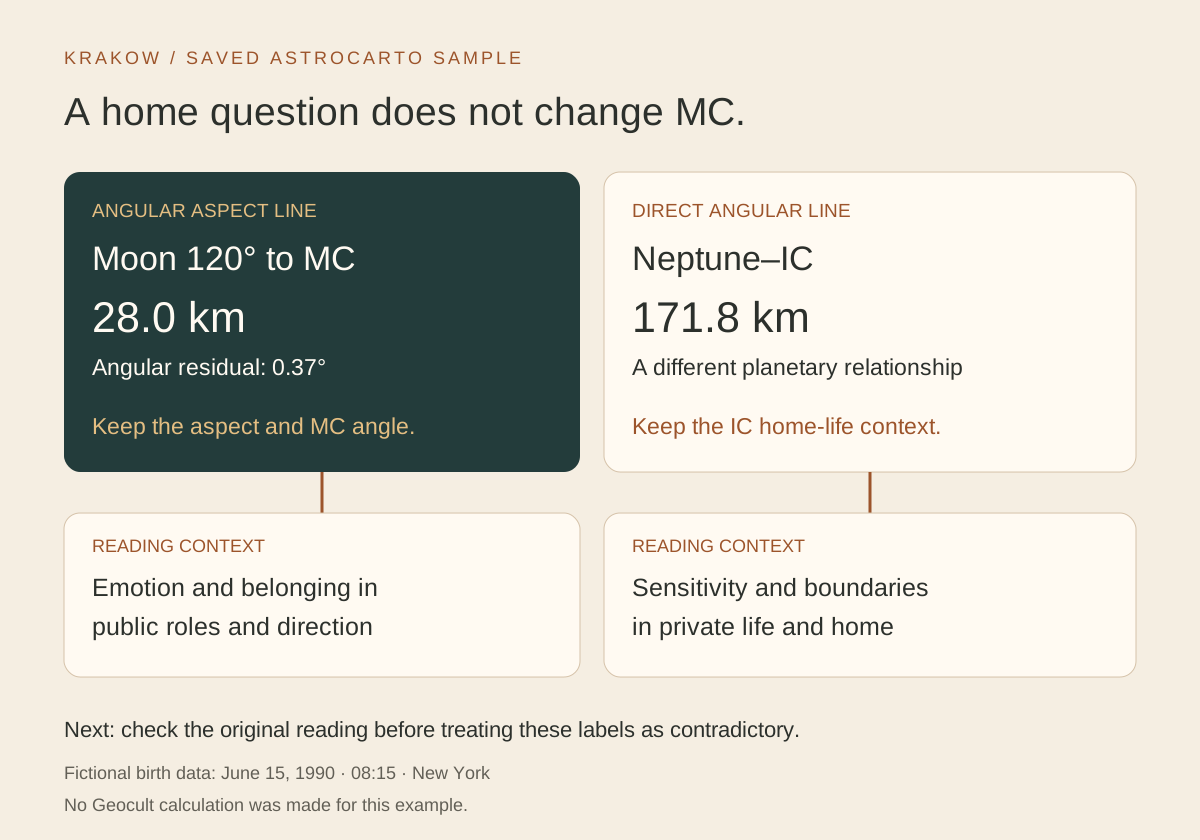
An illustration of saved AstroCarto evidence, not a Geocult screenshot or a comparison of calculation accuracy.
The practical value is specificity. A broad home interest from Geocult becomes two questions: how public responsibilities could affect belonging, and how private expectations could be clarified. The Moon label includes MC and a 120° aspect; it is not a Moon IC line just because the reader asked about home.
Use those distinctions to discuss evening responsibilities and private space. These are suggested applications, not events predicted by the tools. Bring your Geocult passage alongside your map result before deciding whether the two interpretations agree.
For your notes, record the city, the exact Geocult passage and reading type, the complete map label and units, and one question to investigate next. If a field is missing, leave it unresolved. The goal is a useful place inquiry, not forcing two different outputs into identical wording.
Bring Your Geocult Birth Details Across Carefully
A small input convention matters when moving from Geocult to this form. The Geocult natal instructions reserve 12:00 for an unknown birth time and ask people born exactly at noon to enter 12:01. That convention is not a change to the original birth record.
Use your actual known time here, or select the explicit unknown-time option. Do not copy a Geocult placeholder as if noon were documented. Likewise, keep a date selected for transits separate from the date of birth.
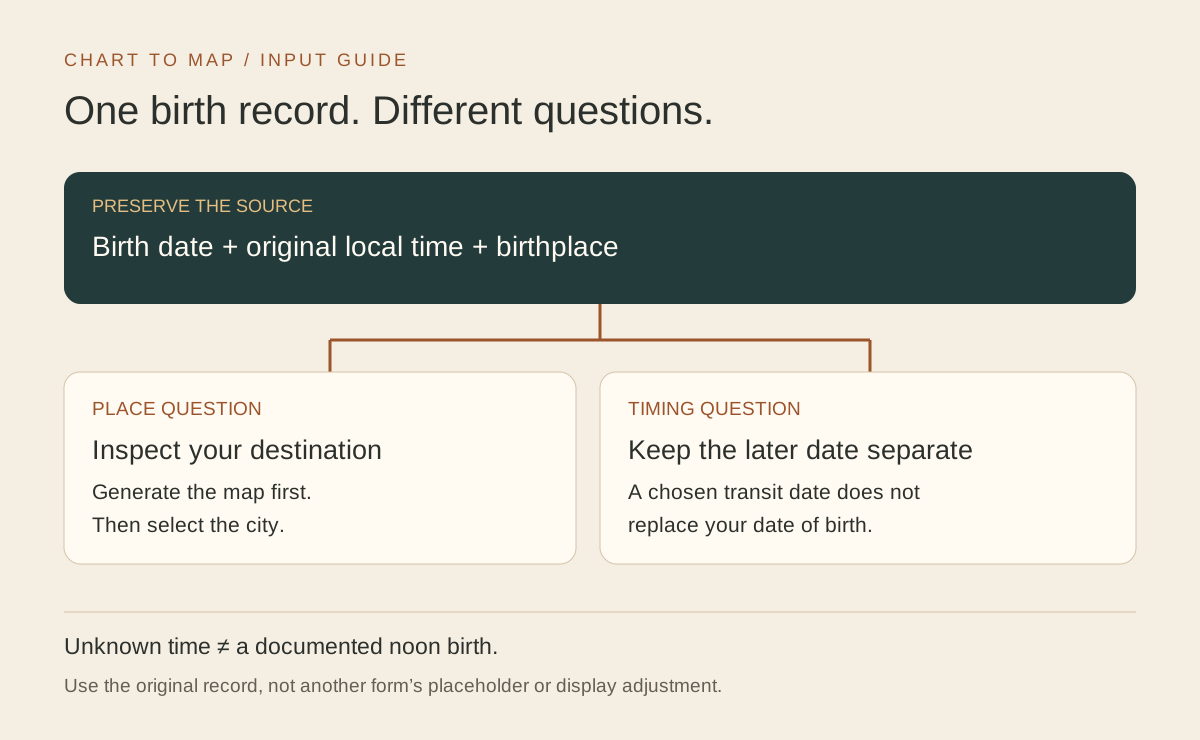
Input guide for a Geocult reader starting an independent AstroCarto map.
Before explaining different results, check that the birth moment, birthplace, and selected destination are consistent. A similarly named city or a timezone discrepancy is an input issue, not a disagreement between interpretations. Unknown birth time limits confidence in precise angular lines; changing a known time to obtain a preferred result does not resolve that uncertainty.
When a Personal Report Is Worth Exploring
A Geocult reading may leave you with several place questions rather than one. If you are now weighing home, work, and relationships across candidates, a fuller synthesis can be more useful than opening unrelated explanations repeatedly.
AstroCarto’s Personal Report brings location findings into a report you can revisit. Where available, AI follow-up can explain the AstroCarto map, comparison, or report context. It does not read your Geocult account or automatically interpret a chart from that service.
For a Geocult follow-up, use the initial map to discover whether you need that depth. A single city question may be adequately served by the available preview. Full reports, additional signals, and deeper tools have separate access requirements. Review those requirements before choosing your next step.
Turn the Comparison into a Place You Can Inspect
Geocult can remain part of your astrology research. AstroCarto is worth trying when you want to examine geographic evidence for a place, compare candidates under one goal, or take a more focused question into a personal report.
You can start without preparing or importing a Geocult chart. Bring your original birth details and one destination. The first useful outcome is a place explanation whose supporting labels you can inspect, followed by a clearer idea of what to investigate next.
Continue With Your Question
For the chart side of a Geocult location inquiry, explore the relocation chart calculator. For help understanding the geographic evidence, use the map-reading guide. Neither is a prerequisite for starting with the form on this page.
03 / QUICK ANSWERS
Geocult Questions
Geocult tools, city checks, and what to expect from your map.
What is Geocult used for?
Geocult offers natal, relocation, transit, and synastry tools. This page focuses on the location questions that can follow those readings. A city map is useful when you want to investigate a destination, not as a substitute for every kind of astrology calculation.
Is the form on this page a Geocult calculator?
No. It generates an independent AstroCarto map from your own birth details. It does not access a Geocult account, import its chart, or reproduce its interpretation. You select the destination after creating your map.
Why try AstroCarto if I already use Geocult relocation?
Geocult provides a relocation-chart approach. Here you can inspect geographic signals and distances around a city, then compare realistic candidates under one goal where accessible. The benefit is another way to examine the place question, not a claim that the calculations are identical or more accurate.
Can I compare cities after a Geocult reading?
Yes. Generate your map, then use the available Compare Cities workflow with the places you are considering. Keep the same goal across them. Your Geocult notes remain separate; the tool compares AstroCarto’s calculated evidence rather than importing those notes.
Can I start if my Geocult birth time is unknown?
Use the unknown-time option if you do not know it, including when Geocult displayed a noon placeholder. Do not guess a time to get precise-looking lines. You can begin exploring, but reliable angular interpretation depends on the quality of the original birth information.
What can I try for free on this Geocult page?
The AstroCarto core map can be generated without signing in. Previews have an allowance; further signals, reports, and deeper tools have separate access requirements. You do not need a Geocult chart or a paid report to begin with your own map.
START WITH YOUR MAP
What Does Your Map Show Around That City?
Bring one destination and one question. Generate your personal map, inspect the available city evidence, and decide what deserves a closer look. The core map is free; additional previews and deeper tools have separate access requirements.
Generate My Map and Check a City