Calculate First · Interpret Second
Astrocartography AI, Built on a Real Map
Generate your personal map, click a place, and use Astrocartography AI with nearby lines, distance, strength, and crossing evidence attached. The calculation stays visible, so the interpretation can be checked instead of guessed.
- Free core map
- No sign-in to generate
- First guest AI question free
Use the interpretation as decision support, not certainty. Verify any move with practical research and firsthand experience.
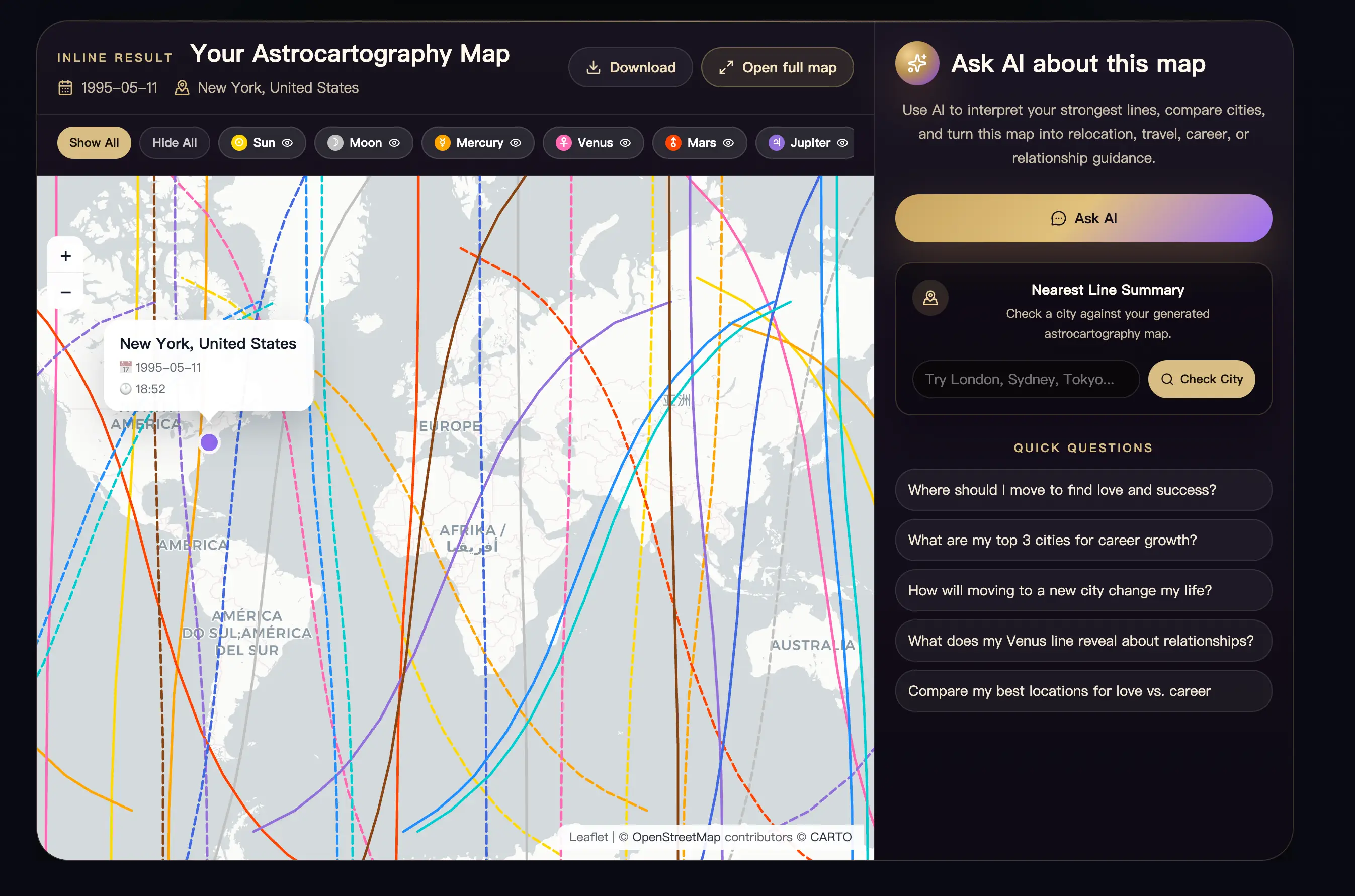
- 01 CalculateReal map
- 02 ClickPlace evidence
- 03 AskContext attached
01 / GENERATE
Create Your Map Before Using Astrocartography AI
Enter your birth date, time, and birthplace to generate the core map. Then click a location or visible planetary line, review the evidence, and open Ask AI from the result.
02 / ATTACHED EVIDENCE
What Astrocartography AI Receives Before It Answers
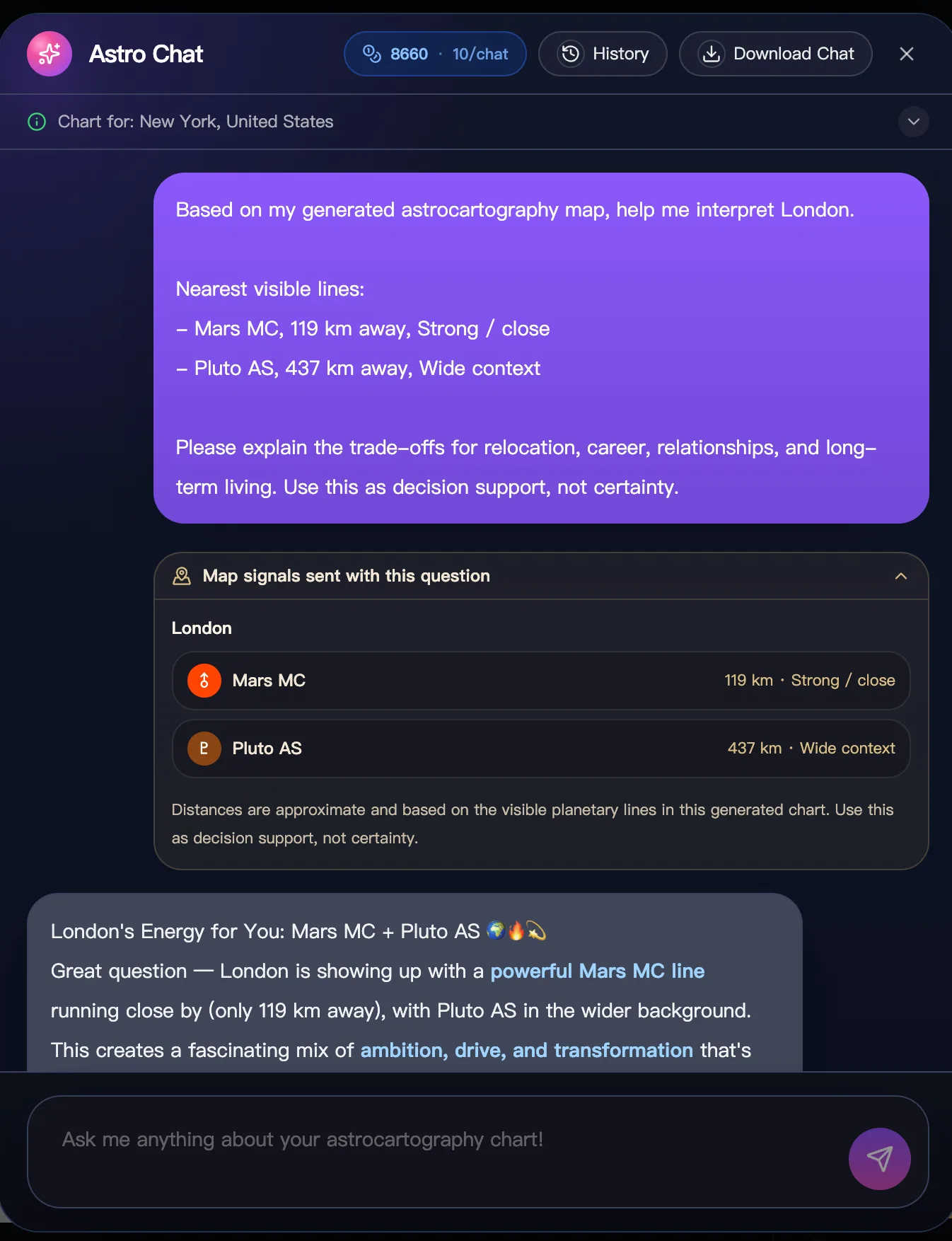
An evidence-grounded question begins with a generated result. Depending on the action you take, Astro Chat can receive context from the whole chart, a clicked location, a checked city, a city comparison, or a completed Personal Astrocartography Report.
For a place-specific question, the attached context can include:
- the location you selected;
- the nearest visible planetary lines;
- each planet and angle combination, such as Mars MC or Moon IC;
- approximate distance and the current strength band;
- available Angular Aspect or Paran signals;
- the question, goal, comparison, or report that led you into the chat.
This does not make an AI answer infallible. It makes the answer auditable. You can compare its wording with the map, see which signals were attached, and notice when the available evidence is weak, mixed, or incomplete.
This distinction matters in Astrocartography AI: calculation answers “what is near this place on this generated map?” Interpretation asks “how might those symbols help me think about this location?” The second task should not quietly replace the first.
03 / PLACE FIRST
Click a Place Before You Ask
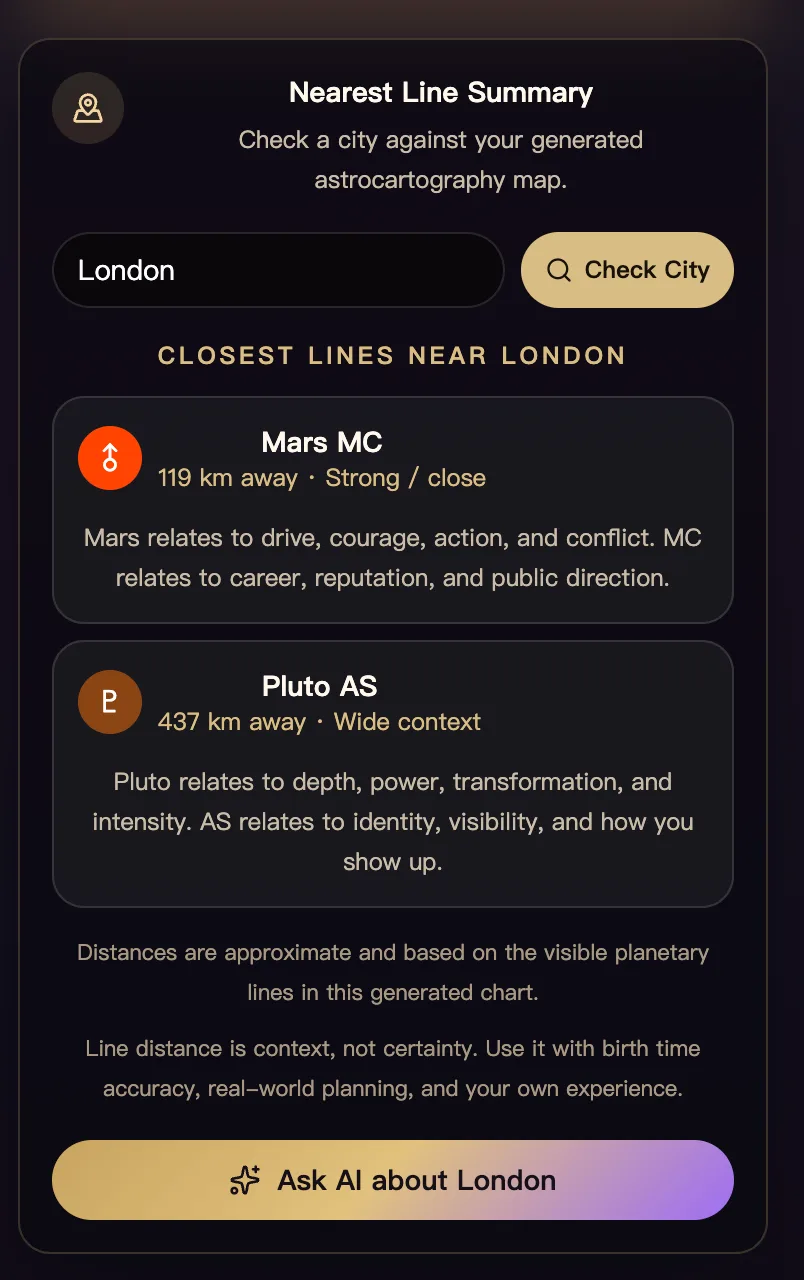
In Astrocartography AI, click anywhere on the generated map to inspect that coordinate, or use Check City when you already have a location in mind. The result can identify nearby visible lines, approximate distances, strength bands, and available crossing signals. From that place reading, choose Ask AI to continue with the evidence attached.
This interaction adds something a static map screenshot cannot provide. A line may look visually close while still being far from the city you care about. A clicked location may also reveal a wider second influence or an available crossing that deserves attention. The place inspection turns a broad world map into a specific question.
A practical sequence is:
- Generate your personal astrocartography map.
- Click a location or check a named city.
- Read the nearest-line and available crossing evidence.
- Ask one focused question about that place.
- Check another city or compare a shortlist before reaching a conclusion.
If the selected location has weak nearby signals, that is still useful information. Ask what a low-signal result means, try Nearby Discovery, or compare it with a place that has clearer support. Do not force a dramatic reading where the map does not show one.
04 / INPUTS MATTER
Astrocartography AI vs Asking ChatGPT to Read a Screenshot
A ChatGPT astrocartography reading and an evidence-grounded AstroCarto question can both produce fluent text, but they do not begin with the same inputs.
| Workflow | What the AI starts with | What you can verify | Best use |
|---|---|---|---|
| Ask a general chatbot from memory | Your typed description and the model’s general knowledge | Whether you copied the facts correctly | Learning broad planet and angle meanings |
| Upload a map screenshot | Pixels, visible labels, and your prompt | What can be read clearly from the image | Discussing a map you already generated elsewhere |
| Use AstroCarto Astro Chat | Generated chart, selected place, available line distance, strength, comparison, or report context | The map, place evidence, and attached context shown in the product | Asking location-specific follow-up questions |
The purpose of this comparison is not to claim that one model always writes better prose. It is to identify where the location facts come from. An astrocartography ChatGPT prompt can be thoughtful and still rest on an incorrect birth time, an unreadable screenshot, a guessed city distance, or a line the user described inaccurately.
AstroCarto uses the calculated product state as the starting point. The AI can explain evidence, surface trade-offs, and suggest questions to verify. It is not allowed to redraw the map, invent a personal line, or turn a symbolic pattern into a guaranteed event. For calculation details, read How We Calculate Astrocartography.
That is where Astrocartography AI adds information rather than simply generating more prose: the visible calculation and selected-place evidence remain available for review.
05 / ASK BETTER
Better Questions Start With a Calculated Result
One place. One decision. One uncertainty. That is enough for a useful first question.
“Where should I move?” is usually too broad for a first Astrocartography AI question. A useful prompt names the place, the decision, and the tension you want to examine.
Relocation and long-term living
Ask: “Based on the attached evidence for Lisbon, what looks supportive for everyday life, and what should I test during a two-week stay before considering a move?”
For questions about when to move, open Best Time to Move from your map results. Choose your city and goal, then sign in for a free preview covering the next 12 months. AstroCarto calculates the timing windows separately from the AI chat.
Career and public direction
Ask: “How might the nearest MC lines affect visibility, responsibility, competition, or communication in Berlin? Separate strong evidence from wider background context.”
Relationships and belonging
Ask: “What do the attached DSC, Moon, and Venus signals suggest I should explore about partnership and community in Montréal? What practical relationship assumptions should I avoid?”
Comparing known cities
Use Compare Cities first, then ask: “Why does Sydney rank differently from London for my stated goal, and which trade-off is most important to verify outside astrology?”
Understanding a difficult result
Ask: “This city has Mars and Saturn influences in different strength bands. Explain the tension without treating either planet as automatically bad or predicting a specific event.”
These questions keep the answer connected to a decision you can investigate. For the full post-generation workflow, see What to Do After Generating an Astrocartography Chart.
06 / HONEST LIMITS
What AI Can Explain—and What It Cannot Decide
Astrocartography uses symbolic interpretations of calculated planetary positions and angles. A responsible Astrocartography AI interpretation can make that symbolic layer easier to examine, but fluent language is not additional astronomical evidence.
AI can help you:
- summarize several attached signals without losing their different strength levels;
- explain the difference between a planet and its ASC, DSC, MC, or IC expression;
- compare support and caution across places you explicitly checked;
- turn a broad concern into more precise questions for a visit, move, job search, or relationship decision;
- identify where the current map evidence is mixed or where more investigation is needed.
AI cannot verify whether your recorded birth time is correct, guarantee that a place will produce love or success, diagnose health or psychological conditions, evaluate immigration eligibility, or know the complete reality of housing, safety, employment, climate, healthcare, accessibility, and family obligations in a city.
Treat the reading as structured decision support. Keep the calculation visible, ask for uncertainty to be stated, and compare the symbolic interpretation with practical research and first-hand experience. A useful answer should make your next check clearer—not make your agency disappear.
07 / ACCESS
Free Access and Follow-Up
You can begin with Astrocartography AI by generating the core map without signing in. After the result appears, a guest can try the first Astro Chat question for free. This lets you inspect the product with your own map context before deciding whether you need a longer conversation.
Additional questions, saved chat history, downloads, report-based follow-up, or other advanced actions may require sign-in, available credits, or an eligible plan. The current interface shows the relevant requirement before you continue; this page does not promise a fixed credit allowance or permanent pricing.
If you only need the map, you can keep inspecting locations and the available core lines without buying an AI answer. If you want a structured multi-place decision record, create a Personal Astrocartography Report. Astro Chat and the report are related but different: chat follows your questions, while the report organizes a reusable location analysis.
08 / QUESTIONS
Astrocartography AI FAQ
01Is Astrocartography AI free to try?
Yes. The core map is free to generate without signing in, and the current guest flow offers a first Astro Chat question for free. Continued chat and advanced actions may require sign-in, credits, or an eligible plan shown in the live interface.
02Can ChatGPT calculate my astrocartography map?
A general chatbot can explain concepts or discuss chart data you provide, but you should not assume its prose proves the underlying astronomical calculation is correct. Generate the map with a calculation system first, then use AI for interpretation and follow-up.
03Can I upload an astrocartography map to ChatGPT?
You can ask a vision-capable chatbot about an uploaded image, but small labels, line styles, coordinates, and distances may be unclear. An AstroCarto question can carry structured map or place evidence instead of relying only on pixels.
04What happens when I click the astrocartography map?
Clicking a location opens a place-specific inspection using the generated map. It can show nearby visible lines, approximate distance, strength, and available Angular Aspect or Paran signals, with actions for deeper exploration and AI follow-up.
05Does Astro Chat know which city I selected?
When you open Ask AI from a clicked location, city check, comparison, or report, the relevant context can be attached to the question and shown in the conversation. Always review the visible context before relying on the interpretation.
06Can Astrocartography AI tell me exactly where to move?
No. It can help compare symbolic evidence and formulate practical questions, but it cannot guarantee an outcome or replace research into visas, housing, safety, work, healthcare, finances, accessibility, or a real visit.
07Do I need an exact birth time?
Use the most accurate recorded birth time available. Astrocartography angles are time-sensitive, so an uncertain time can move location lines and weaken place-specific conclusions. Do not present an estimated time as equally precise.
08What is the best first question to ask?
Name one place, one decision, and one uncertainty. For example: “Using the attached evidence for Tokyo, what looks relevant to career growth, what is only wider context, and what should I verify during a visit?”
CALCULATE · CLICK · ASK
Give Astrocartography AI a Map Worth Reading
Generate the calculation, choose a real place, and ask one focused question with the available evidence attached.
Create My Astrocartography Map