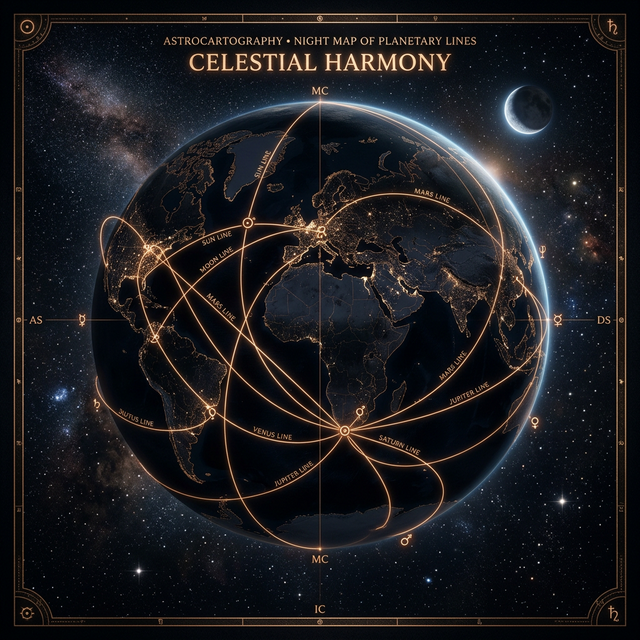
If you have just generated an astrocartography chart, the next step is not to read every line at once. Start with one real city, check the nearest planetary lines, review line distance and strength, then ask AI only after calculated chart context is attached.
That order matters because an astrocartography map can be visually impressive but still difficult to use. The map shows where planetary lines fall, but most users still need help turning those lines into a practical question about a real place.
This guide explains how to move from a generated chart to a clearer city-specific reading.
Quick Answer
After generating an astrocartography chart, use this order:
| Step | What to do | Why it helps |
|---|---|---|
| 1 | Generate the astrocartography chart | Establishes the map before interpretation |
| 2 | Choose one real city | Turns a broad map into a practical question |
| 3 | Check nearest planetary lines | Avoids estimating line distance by eye |
| 4 | Review distance and strength | Adds context before interpreting the city |
| 5 | Ask AI with calculated chart context | Keeps AI connected to the generated map |
The goal is not to find a magical final answer. The goal is to use the map in a more grounded way: chart first, city check second, interpretation third.
A Static Astrocartography Map Is Only the First Step
A static astrocartography map can show where planetary lines fall, but it does not always answer the questions people actually have after the chart appears.
Common follow-up questions include:
- Which line matters most for this city?
- Does a city still matter if it is not exactly on a line?
- How close is close enough to read a planetary line?
- What if several lines are near the same city?
- If I ask AI about a city, is it actually using my generated chart?
These questions are not side issues. They are the real work of using an astrocartography chart. A map becomes more useful when it helps you focus on one place, one goal, and the most relevant chart context around that place.
The Best Order: Chart, City, Lines, Then Interpretation
A useful reading usually starts with the chart, not with a broad AI question.
If you ask “What does my whole astrocartography map mean?” the answer can become too general. A better workflow is:
- Generate the chart.
- Pick a city you actually care about.
- Check which planetary lines are nearest to that city.
- Look at distance, strength, planet, and angle.
- Ask AI with that calculated chart context attached.
This order keeps the reading tied to the map. It also makes it easier to compare places without turning astrocartography into a vague ranking system.
Step 1: Start With One Real City
Instead of trying to interpret the entire world map at once, choose one real place.
That place might be:
- a city you live in now
- a city you are considering for relocation
- a travel destination
- a place connected to work, study, family, or relationships
Examples of better first questions:
- What does London look like for career visibility?
- Is Sydney supportive for long-term home life?
- What should I notice about Tokyo in my astrocartography chart?
- Does New York show stronger public or relationship themes for me?
This turns the chart from a map of the whole world into a specific reading surface.
Step 2: Check the Nearest Planetary Lines
Once you choose a city, the next step is to check the nearest planetary lines around that city.
This is more useful than estimating by eye. A city may sit near several visible lines, or it may be close enough to one line to deserve attention even if it is not directly on top of it.
When you check a city in AstroCarto, the point is not to create a “best city” ranking. The point is to show city-line context:
- selected city
- nearest visible planetary lines
- approximate line distance
- strength label
- planet and angle
- main interpretation theme
That city-line context gives you a clearer starting point before reading the meaning.
Step 3: Understand Line Distance and Strength
Line distance is interpretation context, not certainty.
A city does not need to sit exactly on a planetary line to be worth checking, but closer lines usually deserve more attention than distant ones. Distance also works best when read together with the planet, angle, and the question you are asking.
AstroCarto uses distance bands as practical reading context:
| Distance | Strength label | How to read it |
|---|---|---|
| 0–120 km | Strong / close | Very noticeable chart context |
| 121–250 km | Nearby | Worth reading carefully |
| 251–400 km | Broad | Useful but less direct |
| 401–644 km | Wide context | Background influence |
| 645+ km | Weak | Usually less central to the reading |
These bands are not universal astrology laws. They are a practical way to help users stop guessing and start comparing cities with clearer context.
Step 4: Read the Planet and Angle Together
A planetary line is not only about the planet. The angle matters too.
For example, Venus MC is not the same as Venus DS. Saturn IC is not the same as Saturn MC. A useful reading looks at the planet, angle, distance, strength, and the user’s real question together.
A few examples:
- Venus MC may point toward visibility, public charm, creative reputation, or social ease in career-facing contexts.
- Moon DS may point toward emotional response, relationships, and how other people mirror feelings back to you.
- Saturn IC may point toward home, roots, responsibility, private life, or emotional weight.
- Mercury AS may point toward communication, movement, learning, and a more mentally active experience of place.
The real question is not “Is this planet good or bad?” A better question is:
What does this planet-angle combination emphasize for this city and this goal?
Step 5: Ask AI With Calculated Chart Context
AI astrocartography interpretation works better when it is connected to the generated chart.
If you ask AI from a city check in AstroCarto, the question can include calculated chart context such as:
- selected city
- nearest planetary lines
- approximate distance
- strength label
- planet and angle
- user question
AstroCarto calls these attached details map signals. AI does not create them. They are calculated before the answer is generated.
That distinction matters. The AI answer should interpret chart context; it should not invent planetary lines, calculate line distance on its own, or pretend to choose a guaranteed destiny city.
Example: Checking London After a Chart Is Generated
Here is a synthetic example showing the reading format.
| Field | Example value |
|---|---|
| City checked | London, United Kingdom |
| User question | Is London supportive for career visibility? |
| Closest signal | Venus MC · 128 km · Nearby |
| Additional signal | Moon DS · 242 km · Broad |
| Additional signal | Saturn IC · 398 km · Wide context |
A city check like this does not mean London is automatically the best city. It means London has several nearby chart signals that may be worth interpreting in relation to the user’s goal.
For example, Venus MC may make London worth reading for public-facing work, creative reputation, social visibility, or career charm. Moon DS can add relationship and emotional response themes. Saturn IC can add home, roots, responsibility, or private-life weight.
The reading becomes more useful because it is based on visible chart context around a real city.
What “Map Signals Sent With This Question” Means
When a city question is sent to AI, AstroCarto can show the calculated context attached to that question.
Example:
Map signals sent with this question

London, United Kingdom
- Venus MC · 128 km · Nearby
- Moon DS · 242 km · Broad
- Saturn IC · 398 km · Wide context
This is not an AI-generated receipt. It is a record of the chart context calculated before the AI answer.
That makes the interpretation easier to question, compare, and understand. You can see what the AI had available, instead of wondering whether the answer came from your generated astrocartography map or from a generic astrology prompt.
What AstroCarto Improved Recently
We recently improved AstroCarto around this exact workflow:
Generate the chart
→ check a city
→ review nearest planetary lines
→ understand distance and strength
→ ask AI with calculated chart context attached
The goal is not to replace the map with AI. The goal is to make the map easier to use before AI interpretation begins.
The current AstroCarto workflow is designed to help users:
- generate the core astrocartography chart directly on the page
- check any city against the generated map
- review nearest visible planetary lines
- see approximate distance and strength
- ask AI with calculated chart context attached
- view an example report before generating their own chart
This is still interpretation support, not certainty. But it makes the next step after generating a chart clearer.
What This Still Does Not Do
A better workflow should also have clear boundaries.
AstroCarto does not:
- choose a guaranteed best city
- treat line distance as certainty
- use AI to create planetary line distance
- use AI to invent map signals
- replace practical decision-making
- replace visa, job, safety, cost, family, timing, or health planning
Astrocartography can be useful as a symbolic decision-support layer, but it works best when real-world facts stay in the conversation.
Common Questions
Should I read every astrocartography line after generating a chart?
No. Start with one real city and one real question. Reading every line at once can make the chart feel confusing. City-specific reading is usually easier to act on.
How close does a city need to be to an astrocartography line?
There is no single universal cutoff. In AstroCarto, line distance is treated as interpretation context. Closer lines usually deserve more attention, but distance should be read together with planet, angle, strength, and the user’s goal.
Is AI required to read an astrocartography chart?
No. The chart and city-line context come first. AI is optional follow-up interpretation. It is most useful when it receives calculated chart context rather than a broad question with no map evidence.
Where to Go Next
If you already have a chart, choose one city and check the nearest planetary lines before asking for interpretation.
If you have not generated a chart yet, start with the free chart workflow:
- Generate your free astrocartography chart
- See an astrocartography chart example
- Read how AstroCarto calculates astrocartography
- Compare two cities with astrocartography
- Learn how to read astrocartography lines
The useful path is simple: generate the chart, choose a city, check the nearest lines, then interpret the result with clear chart context.