
Looking for an Astro Com Astrocartography Chart? Astro.com’s map is available through AstroClick Travel. If two cities both look promising, create your free AstroCarto map below, then compare their support and cautions for one goal. AstroCarto independently provides this form and its results.
Astro Com Astrocartography Chart
Create Your AstroCarto Map
Find Your Astro Com Astrocartography Chart
The chart in this search is a geographical map associated with Astrodienst’s AstroClick Travel. It places planetary and angular lines on the world rather than arranging planets around a circular birth-chart wheel. On Astro.com, look under Free Horoscopes, then Locational Astrology.
An Astro Com Astrocartography Chart starts from your birth record. Prepare the birth date, recorded time, and birthplace. Your destination is a second location to investigate after the map exists; replacing your birthplace with that destination changes the input instead of checking a new place.
For detailed profile setup and map-click instructions, use our AstroClick Travel guide. Here, the question is what to extract from the chart once you can see it: a particular location, a complete line label, its proximity, and a reason to investigate further.
Read the Map Before Interpreting It
On an Astro Com Astrocartography Chart, begin with the planet and angle together. AstroClick Travel uses four same-color lines for each planet, corresponding to AS, DS, MC, and IC. Its explanations can be opened by selecting a planet, line, crossing, or map point.
The labeled illustration below is an AstroCarto sample report map, calculated from fictional birth details. It provides a reading exercise, not an Astro.com screenshot or your personal result.
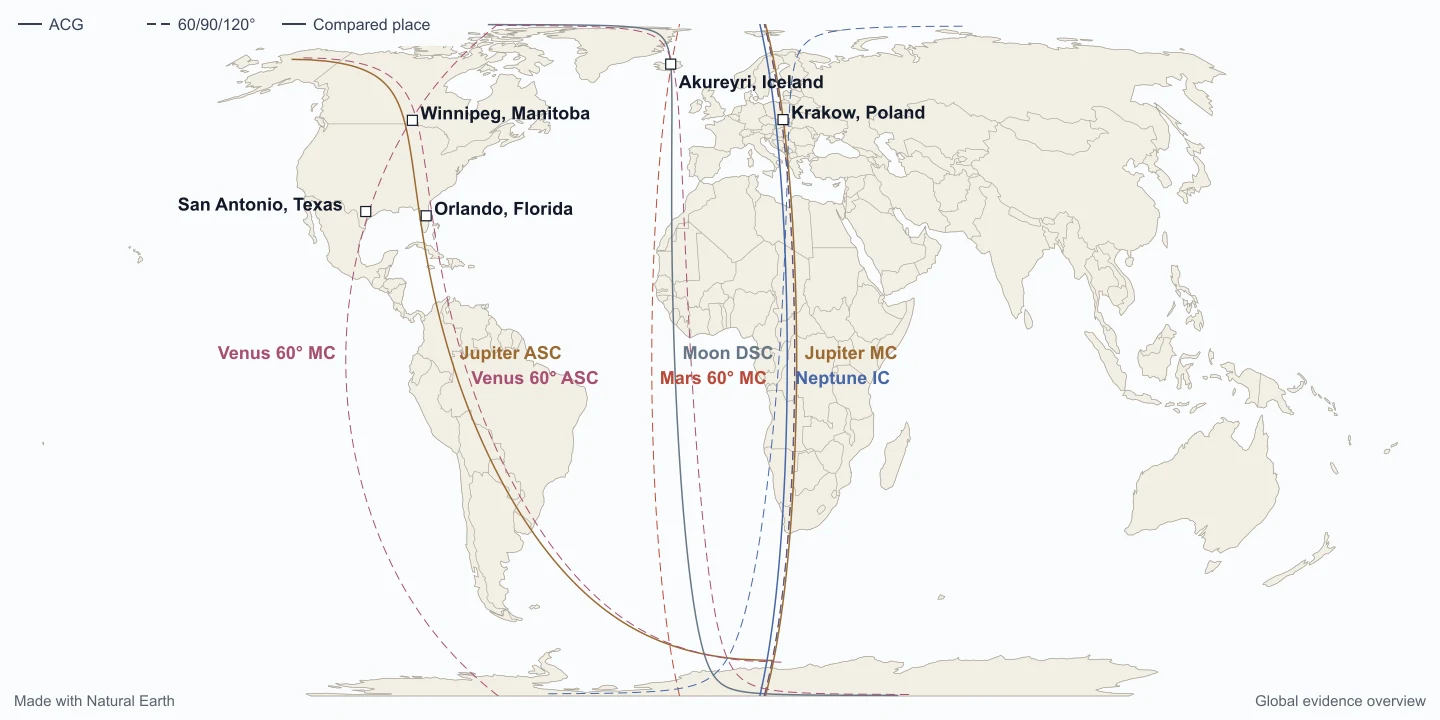
Use the labels already on this map to separate four things:
| Map element | Example you can locate | What to record |
|---|---|---|
| Planet and angle | Jupiter ASC beside the solid line through the Americas | Both names: Jupiter identifies the planet; ASC identifies the Ascendant angle. |
| A different angle | Moon DSC near Iceland; Jupiter MC and Neptune IC through Europe and Africa | DSC is Descendant, MC is Midheaven, and IC is Imum Coeli. Do not merge them into one generic planetary theme. |
| Additional layer | The dashed Venus 60° ASC line | This sample’s dashed paths are angular-aspect lines. A degree label changes the object being read. |
| Destination marker | The square beside Orlando, Florida | The city is a point. Inspect its measured distance to a line instead of estimating from the apparent thickness of the path. |
In your Astro Com Astrocartography Chart notes, preserve the source labels. AS/ASC and DS/DSC name the same respective angles, but this does not establish that two services use identical calculations or interpretations. The line styles above belong to this AstroCarto illustration.
An Astro Com Astrocartography Chart Reading, Step by Step
Start with this worked example. These saved AstroCarto results use a fictional birth record: 15 June 1990, 08:15 local time, New York, United States, at 40.7128° N, 74.0060° W, with the America/New_York time zone. The selected destination is Orlando at 28.53834° N, 81.37924° W.
This example isolates two ordinary planetary lines. The global map above displays a selected set of layers; it is not an inventory of every line considered in the destination result.
1. Locate the City and the Closest Points
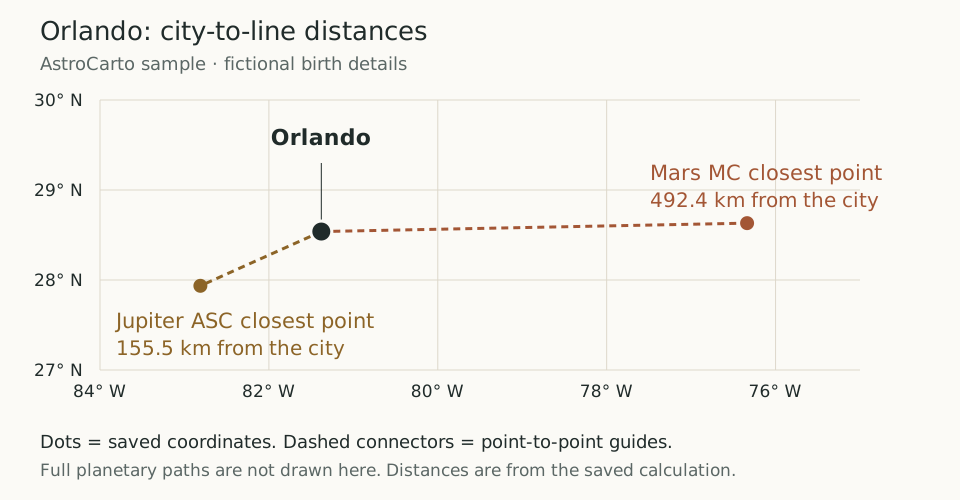
This coordinate diagram positions the city and each saved closest point on a longitude/latitude grid. The connectors identify which points belong together; they do not draw the full planetary paths. Distances come from the saved calculation, not a ruler applied to the picture.
2. Read the Complete Distance Row
| Field | Jupiter ASC | Mars MC |
|---|---|---|
| Planet | Jupiter | Mars |
| Angle | Ascendant | Midheaven |
| Saved city-to-line distance | 155.5 km | 492.4 km |
| Closest point on the line | 27.93548° N, 82.81132° W | 28.63167° N, 76.33714° W |
Jupiter ASC is closer to this destination than Mars MC in this saved example. That is the conclusion the distance rows support. They do not establish that Jupiter is the best line for every goal, that Mars is harmful, or that Orlando is the right home for this person.
3. Read the Home Assessment Alongside the Distances
An Astro Com Astrocartography Chart may prompt a home question: is Orlando worth a trial stay? The saved AstroCarto Personal Report assesses Orlando using the fictional birth record above:
- Home, family, and community: mixed. The report identifies supporting and cautionary evidence for this goal.
- Primary support: Moon 120° to ASC, 187.3 km away. This is the support named in the report’s home explanation.
- Main tradeoff: Uranus 90° to MC, 156.9 km away. Read this caution alongside the support when investigating the destination.
These two paths are angular-aspect lines; retain their degree labels. Jupiter ASC, measured earlier, also appears among the supporting evidence. Yet the closer Jupiter line does not turn the overall home assessment into an unqualified recommendation. The report considers several kinds of evidence, including Parans and relocated houses.
The report suggests testing an ordinary workweek in Orlando. Choose a home-related observation, such as whether you can maintain a daily routine, and review it after the novelty fades. That observation is yours to make; the report has not measured your daily life.
When reading your Astro Com Astrocartography Chart, compare your current city and candidate under Home & emotional stability in AstroCarto. Read each result’s support, cautions, and line details to identify what deserves investigation during a visit. This exercise uses a saved report interpretation, not a live Check City or Compare Cities result; those tools have different scopes and may return different findings.
Open the full AstroCarto report example to read this assessment in context. Your birth details will produce your own results.
What a Nearby Line Can and Cannot Tell You
An Astro Com Astrocartography Chart can direct your attention toward a region. The city check makes that attention more precise: which planet, which angle, how far from the destination, and what other findings deserve a look?
A country-level impression is not enough. Two cities in the same country can have different distances to the same line. A crossing elsewhere on the map also should not be treated as a feature of the city you selected.
Keep three statements separate in your notes:
- Observation: the selected place, complete line label, and displayed distance.
- Interpretation: the themes described for that line or place, including any competing findings.
- Decision: whether the destination fits your real work, relationships, housing, and other priorities.
The tool supplies astrological context, not calculations of practical conditions. A nearby line is neither a guaranteed benefit nor a reason by itself to rule a city out.
Read the Same Chart Question in Both Tools
When comparing an Astro Com Astrocartography Chart with an AstroCarto result, use the same birth details and the same location. Compare the actual tasks below rather than matching two screenshots by color.
| Your question | Astro.com / AstroClick Travel | AstroCarto |
|---|---|---|
| What does this specific line mean? | Select the line, identify its planet and angle, and read its explanation. | Inspect the corresponding planet and angle, then check its distance from the selected place to connect the theme to your destination. |
| How should I read this city? | Select that map point and read its location explanation. | Use Check City to inspect support and cautions with their line details, so you can investigate competing findings before favoring one theme. |
| Which of two places should I investigate as a home? | Read both locations with the same home question in mind and keep notes from each. | Add both to Compare Cities, choose Home & emotional stability, and read each city’s support, cautions, and reasons before planning a trial stay. |
Suppose your Astro Com Astrocartography Chart has drawn your attention to two possible homes, but each location explanation contains appealing and difficult themes. You can use AstroClick Travel’s explanations to build your own comparison. AstroCarto offers a structured next step: Home & emotional stability keeps both cities under one goal, while their result cards and evidence details show what supports each assessment and what needs caution.
For example, a promising support label beside a caution is a reason to open the underlying line details. Identify what to investigate in each place, then plan a visit around those questions. Do not turn the city order into a moving decision.
Entering your birth details again creates that independent comparison; it does not import your Astro.com chart. If reading individual line explanations already answers your question, you can finish there. The additional workflow is useful when you have a shortlist and want to examine both places consistently.
Apply the Reading to Your AstroCarto Map
Start with the form above and your own birth record. Generate the map, select a city you know, then inspect a destination you are considering. Record the complete planet-and-angle label beside the distance; read the explanation before deciding how it relates to your goal.
If your Astro Com Astrocartography Chart and the new map look different, first check the birth record, selected coordinates, planet, angle, and active layers. A dashed aspect path and an ordinary angular line are different objects. These services are independent; matching inputs does not guarantee identical outputs.
AstroCarto’s core map is free to generate without signing in. City checks and basic comparisons have limited free allowances, with further access explained in the tool. A Personal Astrocartography Report provides a deeper reading when you want to examine the broader location context.
Keep the Location, Line, and Question Together
An Astro Com Astrocartography Chart becomes easier to use when each note refers to something you can find again. Keep the birth record, destination coordinates, complete line label, and distance together before adding an interpretation.
Keep the Observation Specific
Use the Orlando example’s structure, not its answer. Replace the fictional birth details and destination with your own, then record the values actually displayed in your result. A saved number from another chart cannot tell you how close a line is on yours.
Keep the Comparison Consistent
Compare realistic destinations for one priority at a time. If two results contain mixed findings, examine their reasons rather than counting attractive planet names. A place that raises useful travel questions may need a separate assessment for a long-term home.
Keep the Next Step Practical
Use your reading to identify what to investigate next: a short stay, ordinary routines, or a conversation about a potential move. Check practical constraints yourself. The interpretation can organize that investigation without deciding it for you.
Explore the Related Guides
- Astro.com astrocartography overview — understand the wider tool context.
- How to read an astrocartography map — follow the general reading method.
- AstroCarto and Astro.com comparison — compare the services in more detail.
03 / QUICK ANSWERS
Astro Com Astrocartography Chart Questions
Chart setup, sample results, and reading your own destination.
Is this the same as a circular birth chart?
No. This search concerns a geographical map of planetary angular lines. A circular birth chart presents a different view of the birth moment. Use the location map when your question concerns places; do not treat a wheel screenshot as a map of line distances around a city.
Where do I find the chart on Astro.com?
Find AstroClick Travel in Free Horoscopes under Locational Astrology. That is the map discussed here. Our form creates an independent AstroCarto result and does not sign in to an Astrodienst account or import a saved profile.
Can I read it without knowing my birth time?
Reliable birth timing matters for angular and location-specific interpretations. AstroCarto offers an unknown-time option, but it does not restore missing timing information. Keep that uncertainty visible and revisit precise location conclusions if you later find a reliable record.
Why do two services show different-looking charts?
Check inputs and display layers before comparing interpretations. Match the destination and the complete planet-and-angle label. Different projections, selected layers, calculation settings, or interpretation methods can affect the comparison; do not assume a visual difference proves either service wrong.
Is the Orlando example calculated by Astro.com?
No. The labeled map, coordinates, and distance values come from AstroCarto’s public sample with fictional birth details. They teach a reading method; they are not an Astro.com output, a customer testimonial, or your personal forecast.
Is the AstroCarto map on this page free?
Yes, the core map is free to generate without signing in. Additional city checks, comparisons, and full reports follow the allowances and access requirements shown in the tool. The free map does not imply unlimited access to every later action.
START WITH YOUR MAP
Read the Lines Around Your Own Destination
Turn your Astro Com Astrocartography Chart question into a specific place check. Create an independent AstroCarto map, select a destination, and read its line labels and distances together.
Create My Free Map