
Generate and read a Personal Report
A Personal Astrocartography Report in AstroCarto brings a place portfolio, five life themes, city assessments, and their evidence into one reading. Start with the overall conclusion and its trade-off, then check the goals that matter to you and the evidence behind each city.
- Choose this report
- Generate and check status
- Read the verdict
- Compare life themes
- Trace the evidence
- Check sensitivity
- Continue your research
What does this report cover?
The complete Personal Report connects overall place priorities with career and money; love and partnership; home, family, and community; wellbeing and growth; and travel and exploration. Its city analyses combine the available astrological evidence and explain trade-offs across these themes.
Check the report’s input and scope before reading it. The Personal Report entry from the map starts a broader discovery reading; it is not a promise to rank every city in the world or to use the same city set as another report.
For a selected goal and region, use the Best Places Report. For two to four cities you choose yourself, use the Full AI City Comparison Report. The report selection guide explains the differences.
How do I generate it and check its status?
- Generate your map with confirmed birth date, birthplace, and accurate birth time. The current complete Personal Report flow requires an exact-time input; do not relabel an estimate to bypass this requirement.
- Open Personal Report from the map results and sign in when prompted. Review the birth details and resolve any timezone or repeated-clock-time choice shown before continuing.
- If you see a free overview, read its patterns and five-theme tendencies as an overview. Specific place results and the complete evidence reading require the complete report.
- Choose Create complete report when offered, or Unlock complete report to review access options. Check your available report allowance or the purchase prompt. Report allowances are separate from AI chat credits. If the interface offers an existing matching report, open that result instead of starting a new one.
Generation may continue in the background. Use the displayed My Astrology Reports entry to check status and open the report when ready. If a failure message states that the reserved report allowance was restored, follow that message before retrying. Do not infer an allowance refund from a slow screen alone.
The free overview and complete report have different retry states. Follow the action for the output you requested. If the status or access remains unclear, contact support with the report type and message. Check current plans and allowances for purchase conditions.
When the complete report opens, look for Your 10-second verdict, Read by life theme, and City deep dives. These are the starting points used below. If you chose Create earlier report version using an older allowance, that report has a different format; its section names and available controls may differ from this guide.
How do I use the overall verdict?
Read the leading places and the biggest trade-off together. “First overall” identifies a priority within that report’s evaluated portfolio; it does not mean the city wins every life goal or guarantees a successful move.
Our public Personal Report sample is a synthetic example generated on July 14, 2026, using the report-v2 format. It names Orlando, Florida as the overall leader and love and partnership as a key trade-off. This is a reading of the published sample, not a new calculation or a customer outcome.
A worked example: career first, relationships also matter
Suppose you are using this sample to practise a career-first reading while keeping relationships in view. This is our teaching question, not a preference supplied by the sample person. Keep Orlando as an overall candidate, then check Akureyri in Career & money and San Antonio in Love & partnership. You now have three places to investigate for different reasons, rather than one automatic winner.
In this sample, the theme leaders still have a Mixed verdict. A leading position identifies a relative priority among the evaluated places; Mixed means the reading contains competing signals. Read the verdict, its explanation, and its confidence separately. High confidence can accompany a mixed assessment: it does not turn that assessment into an unqualified recommendation.
How do I compare the five life themes?
In Read by life theme, select Career & money. Read the verdict and explanation, then switch to Love & partnership. The selected theme changes the summary you are reading. To check one city across both goals, go to City deep dives, expand its name, and read its individual theme assessments.
| Sample result | Priority place | Question to investigate |
|---|---|---|
| Overall | Orlando, Florida | Does the overall balance fit my priorities despite the relationship trade-off? |
| Career and money | Akureyri, Iceland | How does its career reading compare with realistic work opportunities? |
| Love and partnership; travel and exploration | San Antonio, Texas | Am I evaluating relationship goals, a visit, or both? |
| Home, family, and community; wellbeing and growth | Winnipeg, Manitoba | Would its themes fit the daily life I want to investigate? |
Read Akureyri’s career assessment in full
Read the three parts of the explanation together: primary support, main trade-off, and conflict to watch. Akureyri’s sample career assessment names Jupiter support, a Mars trade-off, and a Jupiter–Saturn Paran conflict. Its final verdict is Mixed. For a first reading, record that balance before investigating the individual evidence fields.
For our career-first question, keep Akureyri for further investigation and record the trade-off alongside the support. Then read its Love & partnership assessment. That assessment is also Mixed and includes the nearby Moon–DSC line as a conflict. Being the career leader does not settle the relationship question. A useful note is “career candidate with relationship questions to investigate,” rather than “best city for every part of my life.”
Locate the same reading steps in a city report
The sample PDF below shows Orlando’s city section. Start with the city summary, then read its Jupiter–ASC example at 155.5 km, the relationship trade-off, and the decision checklist. This connects the city’s overall reading to a specific observation and a question to investigate. The interactive evidence filters are covered in the next section.
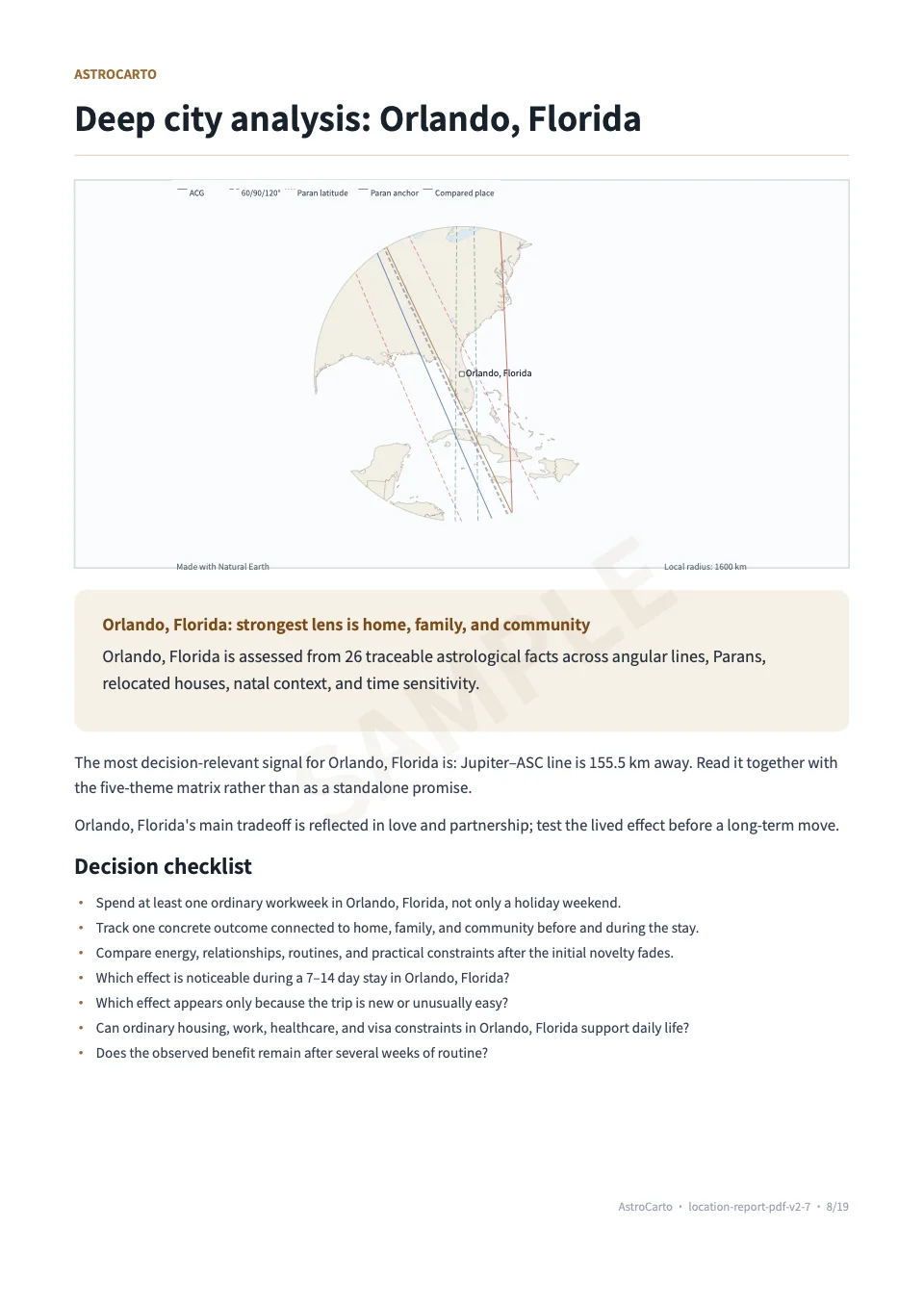
Keep short visits and long-term residence separate. The report’s city questions can help you plan an ordinary stay, but employment, housing, healthcare, family needs, and permission to live there still need independent research.
How do I trace a conclusion back to its evidence?
Use Orlando to practise following a conclusion back to a specific result. Its career assessment identifies Mercury at 60° to MC as primary support, Uranus at 90° to MC as the main trade-off, and a Mars–ASC / Uranus–MC Paran as a conflict. The evidence explorer lets you identify these records; the theme assessment explains their role in this particular reading.
First, check one supporting record and one trade-off
- Expand Orlando in City deep dives and find Career & money. Note the planet, angle, aspect, and distance from the explanation.
- Go to Evidence explorer. Change All cities to Orlando, Florida and All evidence types to Angle-aspect line.
- Expand the matching cards to read their summaries. The Mercury entry shows 60° to MC and approximately 64 km; the Uranus entry shows 90° to MC and approximately 157 km. Card distances are rounded to whole kilometres, so they match the narrative’s 63.7 and 156.9 km.
- Return to the career assessment with the two records you checked. Keep its additional Paran conflict in view too; the advanced explanation below shows how to inspect it. The Mercury support does not cancel either caution. The sample’s resulting career verdict for Orlando is Mixed.
If a card is missing, check the city and type filters first, then use Load more evidence if shown. The public sample is a preview; the filtering instructions above describe the complete interactive report. You can follow the published values here without generating a report.
Advanced: evidence fields, percentages, and Paran distances
Use this explanation when checking a particular field. In Evidence explorer, keep Orlando selected, switch the type to Planetary Paran, and expand the cards to find Mars ASC / Uranus MC. Its approximately 1,105 km is the city’s distance from the Paran latitude band. The narrative’s 0.64° residual is an angular measure, not another way of writing that kilometre distance.
| Field or record | Meaning in this sample | How to use it |
|---|---|---|
| Mercury · 60° · MC · 64 km | An angle-aspect line, with a rounded city-to-line distance. MC identifies the Midheaven angle; 60° is the aspect. | Match this record to the career explanation. It is distinct from an ordinary Mercury–MC line. |
| 97% on the Mercury card | The evidence-strength value shown for this record. | Use the narrative to see whether a signal is supportive or cautionary for your goal. This percentage is not a job-success probability or a city score. |
| Jupiter–ASC · 155.5 km | An ordinary line cited as support in Orlando’s overall assessment. ASC identifies the Ascendant angle. | Keep the overall assessment separate from the career assessment above; they draw on different combinations of evidence. |
| A Paran record | Two planet-and-angle combinations, with a distance to their latitude band. | Read both combinations. Its distance describes a different geometry from an ordinary line. |
This process gives you a named piece of evidence to discuss instead of relying on a city label alone. For the calculation method behind these different evidence types, see how AstroCarto calculates its results.
What do time and house-system sensitivity mean?
Open Sensitivity checks and read the birth-time summary and the Placidus / Whole Sign summary. This section presents the report’s sensitivity conclusions and explanations; it does not show a side-by-side list of every change at −5, 0, and +5 minutes.
- Read the birth-time sensitivity label. The public sample says moderately sensitive. Treat precise line and house details with that sensitivity in mind, even though the overall confidence is high.
- Read the house-system summary. The sample says the overall direction agrees while some signals differ. This supports keeping the broader reading in view while checking the system behind any particular house interpretation.
- Check your input before acting on a detail. If your birth time needs correction, verify the record and correct the input before obtaining a new reading. The ±5-minute check cannot resolve an unknown or substantially uncertain birth time.
For our worked example, the useful note is “overall confidence high; birth-time sensitivity moderate; check the input before relying on a precise placement.” An exact-time entry is an input requirement, not proof that the recorded time is correct.
Advanced: compare house systems and understand the sample’s time changes
Compare houses using the same city and planet
In Relocated chart snapshots, select your city and switch between Placidus and Whole Sign. Compare the same planet’s Natal house and Relocated house columns. Orlando’s Sun in this sample goes from house 11 to 12 in Placidus, but remains in house 12 in Whole Sign. The useful observation is that both show a relocated 12th-house Sun; the claim that it moved from the 11th house depends on the system.
Record which system you used when asking about a house change. The sample’s overall house-system direction agrees, but this does not make every placement identical. If Placidus displays Unavailable at this latitude, use the available Whole Sign view and retain that limitation rather than treating the missing value as a house number.
Why a stable verdict can still have changing details
As a supplementary explanation, we examined the stored data behind the published sample. Orlando’s five theme verdicts remain Mixed at −5, 0, and +5 minutes, while a Saturn–DSC line appears only in the +5-minute set. These are details from the sample data, not a step-by-step display available in Sensitivity checks. They illustrate why a stable overall label does not mean every supporting detail remains the same.
What should I do after reading?
Choose a small set of realistic places and write down the goal, supporting evidence, main caution, and practical question for each. This turns the report into a research plan you can check against actual opportunities.
Turn the worked example into a research note
For our career-first exercise, a useful note for Orlando would be: “Overall candidate; career verdict Mixed. Mercury 60° to MC supports the career reading, with a Uranus 90° to MC trade-off and a Mars–ASC / Uranus–MC Paran conflict. Relationships need a separate check.” This is an example of organising the report, not a new AI verdict or a recommendation to move.
Add one practical question you can answer outside the report, such as whether suitable work and an ordinary weekly routine are feasible in that city. For Akureyri, keep a separate note on its career support and relationship conflict. If both places remain realistic, the city comparison workflow lets you compare your chosen cities under a selected goal. That is a new scoped comparison and can produce a different order from the Personal Report’s broader portfolio.
Use the completed report’s Ask AI action for a focused question such as “Why does Akureyri lead for career while Orlando leads overall?” The conversation receives prepared report context, including priorities and evidence highlights, rather than every document in your account. AI access and credits apply separately.
For a more specific follow-up, ask: “In Orlando’s career assessment, how should I read the Mercury support alongside the Uranus trade-off and Paran conflict? Separate what the report says from what I still need to investigate.” Check the answer against the named records; asking AI does not replace correcting inaccurate birth details.
Use Prepare PDF if shown, then Download PDF for a copy, and My Astrology Reports to reopen the saved report. A downloaded report preserves that result; it does not update when you change your birth details. Saving a place to My Places is a separate action.
Create your map and open Personal Report