
Use AstroCarto’s astrocartography calculator and explanation to explore the planetary lines near places you care about. Generate your personal map and discover what these lines may mean for relationships, career, and home.
ONE PLACE · VISIBLE LINES · A CLEAR EXPLANATION
Astrocartography Calculator and Explanation
Start with your birth details
Generate your map, then choose a place to inspect its available explanation and evidence. Core map generation is free; previews and deeper features have separate access limits.
From a calculated result to an explanation
How the astrocartography calculator and explanation work together
An astrocartography calculator and explanation answer two connected questions: where are the chart’s planetary lines, and how might you interpret the signals near a selected location? The first produces geographic information. The second supplies symbolic meaning and context. Keeping them separate makes the result easier to understand and harder to overstate.
Your birth date, time, and birthplace establish the chart used to generate the map. A later destination check asks about another location against that chart. Entering a destination as your birthplace changes the starting information; it does not simply ask what your existing map says about that city.
The explanation adds a vocabulary for reading what appears. A planet describes a theme, while an angle identifies a field of experience. Distance describes proximity to the calculated line. A sentence about relationships, confidence, or work combines interpretation with those labels; the distance itself does not measure how happy or successful you will be.
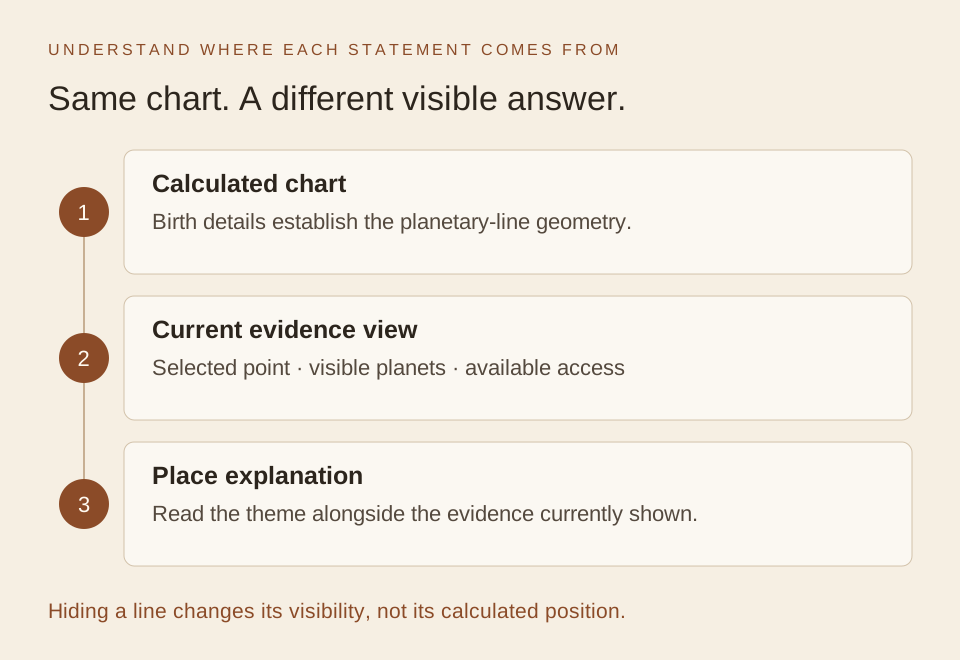
The calculated chart supplies the lines. Visibility determines which lines enter the current place view. The explanation describes that available context.
| Part of the result | What it provides | What it does not establish |
|---|---|---|
| Selected location | The place or coordinate being inspected | That every address in the region has identical evidence |
| Planet and angle | The identity of the planetary line | A verdict about every area of your life |
| Approximate distance | Geographic separation from that line | A success probability or a quality score |
| Interpretation | Symbolic themes attached to the available context | A verified account of a future event |
| Your follow-up question | A way to examine the theme in your situation | Another result calculated by the map |
With an astrocartography calculator and explanation, you can return from a broad sentence to the specific information supporting it. If the sentence claims more than those fields show, narrow the sentence before acting on it. This is especially useful when an appealing line name makes a destination feel immediately convincing.
One place, two different-looking answers
Imagine you have generated a map and opened a city. Its initial answer emphasizes relationships. You simplify the map by hiding planetary lines, then return to the same place and see a different answer or a request to turn lines on. Did the calculation change, or are you looking at a different set of evidence?
An astrocartography calculator and explanation are easier to trust when you can account for that change. Follow one place through the checks below. Keep the birth details and selected coordinate fixed, and record which planets are visible. That gives you a fair comparison instead of two screenshots whose settings you cannot reconstruct.
For a concrete label to inspect, this guide uses a saved fictional personal report based on June 15, 1990, at 08:15 in New York. Its Akureyri summary identifies Moon–DSC about 0.5 km away. This is a saved report measurement, not a live preview or a promise of free access. The display-state walkthrough describes the tool’s conditional behavior; it is not a recorded session at Akureyri.
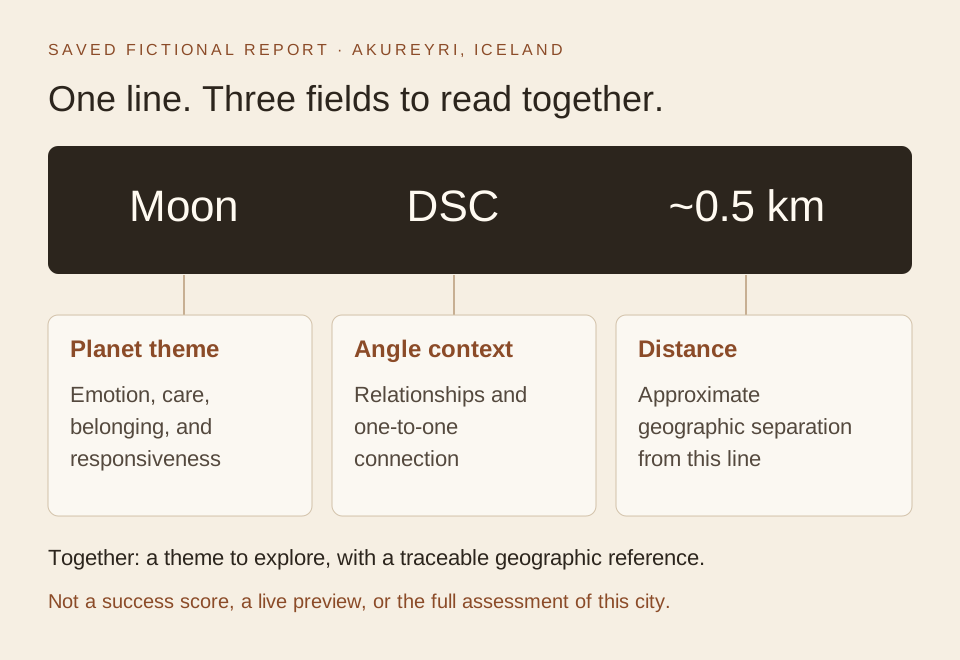
Use the sample to identify the fields. Your own place check supplies the actual visible lines, distances, and answer.
Establish the first answer before changing anything
In this astrocartography calculator and explanation walkthrough, assume an unlocked place preview has Moon–DSC as its primary visible line, with a distance in the strong band. This condition helps explain why the introductory answer emphasizes relationships. It is not a claim that every view of Akureyri selects that line or that one line describes the whole city.
Moon supplies the emotional vocabulary: care, belonging, and responsiveness. DSC identifies the one-to-one relationship angle; some tool labels abbreviate it as DS. The angle explains why the answer points toward relationships rather than treating the Moon as a generic statement about home. The approximate distance places the line in a proximity band; it does not measure relationship success.
Read Start with the answer, then open See why we reached this answer. Keep the headline alongside the primary line’s full label, distance, and other visible context. A useful starting note says which place you selected and which settings produced the answer, rather than simply recording “Moon means relationships.”
Separate the question from the selection
Use a place check for this comparison, not a point selected directly on a planetary line. A line selection deliberately highlights that line, and hiding the selected planet can close that selection. If this happens, reopen the intended place before comparing explanations. You have changed the selected object as well as its visibility; that is a different comparison.
When taking notes from an astrocartography calculator and explanation, preserve the displayed location or coordinate. A nearby studio, hotel, or map click may be a different point. If you need help identifying that difference, the line-to-city guide explains why a location check and a line selection should be kept separate.
What hiding and restoring lines actually changes
The useful distinction in an astrocartography calculator and explanation is between the chart’s calculated lines and the evidence included in the current view. Showing or hiding a planet filters that view. It does not edit your birth details or move the stored line geometry. The visible summary can therefore change without the underlying chart being recalculated.
State A: an available line supports the answer
Begin with the unlocked, Moon–DSC-led place view described above. The explanation’s relationship emphasis has a traceable source: the DSC angle. Its emotional vocabulary comes from the Moon. Its proximity wording relates to the distance band. Those connections let you explain the sentence without attributing every word to a single number.
The saved 0.5 km measurement illustrates geographic distance only. It does not prove that your own result has the same primary line, and it is not an overall rating. Before changing visibility, note any additional signals that the panel shows. They form part of the context you will want to restore later.
State B: all planetary lines are hidden
If all planetary lines are hidden and the place preview is available, there are no visible planetary lines for that answer to describe. The panel asks you to turn on at least one planetary line. This is a display-state explanation, not a new judgment that the city has become neutral or unsuitable.
You can check this distinction in the astrocartography calculator and explanation without changing the birth form. Restore a visible planet, then inspect the same point. If you only hide the Moon while leaving others visible, the remaining evidence may produce another theme. Do not predict which planet replaces it from the Moon sample; read the actual updated result.
State C: restore the original view
Restore the same visibility choices you recorded at the start, then return to the same coordinate with the same selection type. Check the original line’s label and distance before comparing the prose. With the same chart and coordinate, a visibility toggle alone does not move that line or alter its geographic distance.
If the restored answer still differs, check what else changed: the point, a direct line selection, the available access, or the chart itself. Returning to a remembered city name is not enough to establish that every input is identical. This is why a small record of the starting view is more useful than trying to remember the exact phrasing.
| During the walkthrough | What can change | What a visibility change alone does not change |
|---|---|---|
| Hide one planet | Which remaining signals lead the visible summary | The original birth information and that planet’s calculated lines |
| Hide all planetary lines | The answer becomes a request for visible evidence | The city itself or the underlying chart |
| Restore the starting visibility | The original evidence can be inspected again | Distance for the same line and exact point on the same chart |
These are conditional result states, not three generated readings. Use your own astrocartography calculator and explanation to observe which state is actually available. If a preview is locked or the allowance is exhausted, the access message takes precedence; changing line controls does not bypass that limit.
Hidden, distant, and restricted are different findings
A short answer can conceal an important distinction. With an astrocartography calculator and explanation, ask whether evidence is absent from the view, geographically distant, or unavailable under current access. Each case calls for a different next action, and only one is solved simply by showing a planet again.
Hidden lines: no planetary lines are visible. Check the visibility controls and restore the relevant selection. This is not evidence that your chart has no lines, nor does it require inventing a different birth time to get a more interesting result.
Visible but distant lines: lines exist in the view, but none provides a meaningful nearby planetary-line signal for the introductory answer. Keep that weaker or neutral wording. Restoring previously hidden lines may add context, but a distant result is not automatically a mistake. Check the actual distances before deciding what is missing.
Restricted evidence or a locked preview: access limits affect what you can inspect. Retain the limitation in your note. A locked signal is not the same as an absent signal, and a complete report may use a broader evidence set than the preview. Follow the access state shown by the tool rather than filling in an unseen interpretation.
Know when to regenerate the map
Correcting the birth date, birth time, or birthplace is a reason to generate the chart again. Changing visibility is not a correction to those inputs. Selecting another destination changes the geographic question. These actions belong to different parts of the process, even when each produces a different sentence on screen.
Use the unknown-time option if the time is uncertain. Entering a convenient exact time introduces an assumption that should not be mistaken for verified input. The calculation method explains the tool’s approach; for this exercise, the essential step is to record whether you corrected the birth information or only changed the view.
A broader goal assessment also differs from the introductory visible-line explanation. A relationship-focused sentence does not establish that the full report recommends the city for relationships. The full assessment can consider other evidence. Compare findings at the same level before treating their wording as a contradiction.
Make a before-and-after note for your own result
Start your astrocartography calculator and explanation with one location you want to understand. You do not need to reproduce the saved profile. The purpose is to trace your own answer to its evidence, then recognize which change explains a different result.
- Enter your birth details, generate the map, and select a place.
- In an available preview, read Start with the answer.
- Open See why we reached this answer and record the line labels and distances.
- Note the displayed location, visible planets, and any access limitation.
- If you change visibility, return to the same point and compare the new evidence before comparing the wording.
- Restore your original view when you want to return to the original question.
If a deeper reading is available, See the calculation evidence connects its interpretation with the line and distance used. These sections depend on the current result and access. Reopening previews remains subject to the existing allowance; this walkthrough does not create extra checks or require you to spend them just to imitate the example.
The following completed note illustrates the astrocartography calculator and explanation walkthrough. It records conditions rather than claiming a real session took place. Replace each entry with what you actually observe, including an unavailable field when necessary.
| Field | Illustrative starting view | After all planetary lines are hidden |
|---|---|---|
| Chart and place | Same birth profile and fixed city coordinate | Unchanged |
| Selection type | Place check, not a selected line | Same place check |
| Available evidence | Moon–DSC is the primary visible line under the stated conditions | No visible planetary-line evidence |
| Introductory answer | Relationship theme with Moon vocabulary | Request to turn on planetary lines |
| What explains the difference | Evidence is available in the current view | Visibility was changed, not the birth data |
| Next action | Inspect the full label and distance | Restore the starting visibility and recheck the same point |
This note gives you a way to check the astrocartography calculator and explanation without guessing which version is “right.” The starting answer describes the initial evidence; the later message describes its absence from the view. Both can be consistent with the same calculated chart.
For a real result that changes unexpectedly, first find the changed field in your note. Corrected birth information calls for a fresh chart. A different point calls for a location check. Hidden lines call for a visibility check. If your settings match and the discrepancy remains, retain the two sets of details rather than inventing an astrological reason for a possible technical issue.
If the labels themselves are unfamiliar, the interactive reader guide explains the fields. Once you have established which evidence supports the answer, you can return to your personal question about the place. You now know what the tool is describing and what conditions the description depends on.
What does this astrocartography calculator and explanation include?
You can use the map directly on this page. Core map generation is free and does not require signing in. Select a place for the available interpretation and evidence; free previews have an allowance, and some signals or deeper features require additional access. The interface shows the applicable next step.
You can identify a displayed planet, angle, or distance directly. Ask AI offers an optional follow-up for a focused question about available context, subject to its access requirements. A personal report provides a separate structured analysis with its own sign-in and access steps. Both are automated features; neither connects you to a live astrologer.
Start by confirming the visible context. Then, if you want to explore further, ask how another accessible signal qualifies the initial theme or how a broader reading considers a different goal. This keeps a change in display settings separate from a request for a more complete interpretation.
Generate your map and check one place. Read the answer with its evidence open, and keep the selected point and visible planets in your note. You can then explore another view without losing track of why the interpretation changed.
Questions about the calculator and its explanation
Does the calculator explain my results automatically?
The astrocartography calculator and explanation provide a map and available place interpretations after you choose a location. Inspect the supporting labels and distances as well as the summary. Your access and the evidence available at that point determine what you can see; generating a map does not automatically create a complete personal report.
Astrocartography calculator and explanation: does hiding a line change the chart?
No. Visibility filters which planetary lines contribute to the current view; it does not change your birth details or move those lines. The explanation may change because its visible evidence changed. Correcting birth information is a separate reason to regenerate the map.
Can I use this without knowing my exact birth time?
Use the form’s unknown-time option if needed and retain that uncertainty when interpreting the result. Do not manufacture precision by entering a convenient time. A later correction is a reason to generate the map again and recheck the places that matter to you.
Why did the panel close when I hid a planet?
If you selected a planetary line directly, hiding that planet can clear the selection. Reopen the intended place before comparing results. For the before-and-after exercise, use the same city coordinate and selection type so that a line selection is not confused with a place check.
Can I use an astrocartography calculator and explanation without AI?
Yes. You can read available labels, distances, and place explanations directly. An optional AI follow-up can help explore a specific question, but it does not replace checking which evidence is shown or turn a symbolic interpretation into a guaranteed outcome.
What should I do after my first explanation?
Use the astrocartography calculator and explanation to record the selected place, visible planets, and evidence supporting the answer. If you explore another view, compare those fields first. Continue to a broader reading only when you can identify what the initial explanation leaves unresolved.
What does your own result actually say?
Use the astrocartography calculator and explanation for one place. Read the answer, open its evidence, and check the current line settings before deciding what the result means.
Generate My Map