
Find your astro lines with AstroCarto and see where they run across the world. Explore the planetary lines near a city you care about and discover what they may mean for relationships, career, and home.
YOUR LINES · YOUR PLACE · THE DISTANCE BETWEEN
Find Your Astro Lines on the Map
Generate your personal map
Enter your birth details, then select a line or check a city in your results. The core map is free; place previews and city checks have limits, and deeper features have separate access requirements.
From a line to your destination
What are astro lines on a personal map?
Astro lines usually refers to the planetary lines on an astrocartography map. They connect places where a planet was rising, setting, or crossing the upper or lower meridian at the moment of birth. Each ordinary line combines a planet with an angle: ASC, DSC, MC, or IC. These are personal calculations, so someone else’s map does not show where your lines run.
The interpretation has two parts. The planet supplies a symbolic theme, while the angle associates it with an area of life. Jupiter ASC, for example, combines exploration and growth with identity and self-expression. Jupiter MC brings the same planet into public direction and career. Keeping the angle prevents you from treating every Jupiter line as interchangeable.
Your astro lines are a way to explore place symbolism, not proof that a city will produce a particular event. A line can suggest a question worth considering, but it cannot tell you whether a job, relationship, or neighborhood will suit you. That distinction becomes especially useful when an appealing line passes near a destination you already like.
You do not have to memorize all the combinations before starting. Generate the map, identify one complete label, and inspect a place. For a reference covering all ten planets and four angles, open the planet and angle meanings. Then check the city itself: the line you noticed may pass through the surrounding region without crossing your destination.
Find one of your astro lines before judging a destination
Begin with your birth date, local birth time, and birthplace. The birthplace belongs in the form; the city you want to explore is selected afterward. If your time is unknown, use that option and keep angle-sensitive conclusions provisional. A detailed display does not make uncertain birth information precise.
Once your astro lines appear, use the available planet controls to make the map easier to inspect. Focus on one planet temporarily if several paths overlap visually. Read its angle label as well as its name; colors alone are not a reliable identity when moving between different websites or map styles.
A useful first observation is simply, “This is Jupiter ASC, and this is the region it crosses.” It is too early to conclude that every city in that region has the same relationship to the line. Zooming helps you see geography, but the next step is a location query rather than a visual guess about distance.
Filtering astro lines helps you identify a path. It also changes the visible context, so remember to restore other relevant accessible lines before drawing a broader conclusion about a city. A map displaying only Jupiter cannot show how nearby Mars or another hidden planetary line contributes to the available explanation.
When exploring astro lines, keep three details together: the birth profile, the full line label, and the place you want to investigate. If any one changes, you are asking a different question. This small habit prevents an attractive result from one selection being accidentally attached to another destination.
Generate your astro lines and choose a place. You can start by inspecting one available line; you do not need to unlock every feature to understand the difference between a line and a city.
From astro lines to a city: two different questions
When you click directly on one of your astro lines, you select a point on that path. The available explanation identifies the selected planetary line and can add context from other nearby visible lines. It answers a question about that selected point, not automatically about a city whose name happens to appear nearby on the map.
Check City starts from the city you enter. Its summary shows nearby visible planetary lines, approximate distances, and related context within the current access limits. The selected city and the point you clicked on a line can be different coordinates, so their results need not be identical.
| Selection | Question it helps answer | Detail to keep |
|---|---|---|
| A point on a planetary line | What is this line’s theme at this point, and what other visible lines are nearby? | Selected line label and location |
| A city entered in Check City | Which visible lines are near this city, and how far away are they? | City, full line labels, and approximate distances |
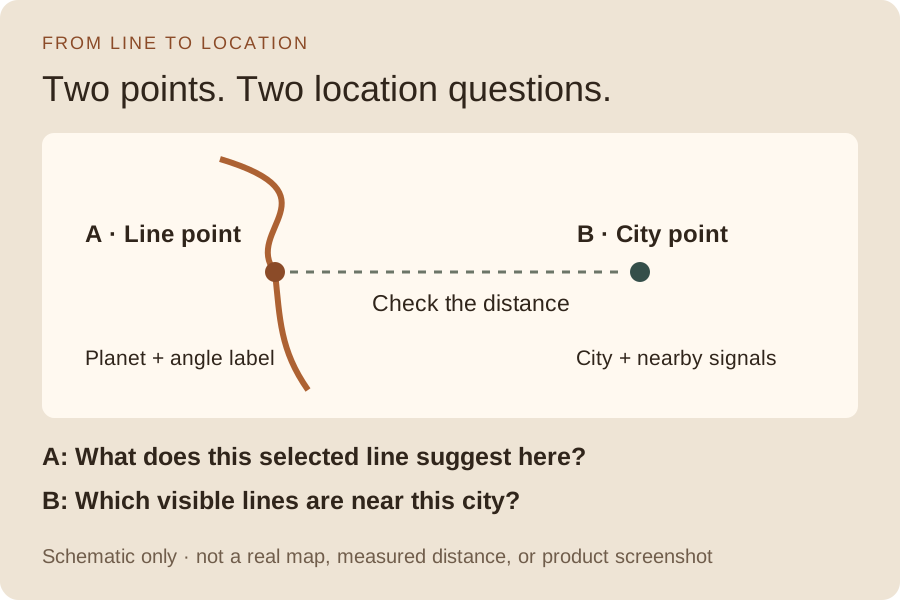
Conceptual diagram, not a map of a real city or a screenshot. Spacing is illustrative and does not encode a measured distance.
Suppose someone notices Jupiter ASC crossing the region around their destination. They click the line, read about exploration, and assume that the destination has that exact result. The missing step is checking the destination itself. Astro lines run through geography; a nearby label on the screen is not a measurement.
This also explains why clicking elsewhere along the same line can change the surrounding context. The selected planetary label may stay the same while other nearby signals differ. You should not carry an entire interpretation along the path as though every location were equivalent. On your astro lines map, keep the place attached to the answer.
A saved example: two astro lines near Orlando
To explore astro lines in a concrete setting, imagine a traveler attending a work event in Orlando and considering half a day of independent exploration afterward. They notice Jupiter ASC in the surrounding region and wonder how it relates to the visit. The trip is an author-written scenario. The distances come from a saved sample Personal Report for fictional birth details: New York, June 15, 1990, at 08:15 local time. They are not a customer’s experience or a live city check.
The sample contains these two ordinary astro lines:
| Saved planetary line | Distance from the sample Orlando point | Theme to investigate |
|---|---|---|
| Jupiter ASC | Approximately 155.5 km | Exploration, confidence, and personal growth |
| Mars MC | Approximately 492.4 km | Drive, ambition, and pressure in public or professional life |
These are two selected report entries. They do not establish a complete nearest-line ranking, reproduce every visible signal, or predict the order of your Check City result. Your birth profile, selected coordinate, displayed lines, and access may differ. Use the example to understand the distinction, not as an answer for your own destination.
Astro lines in the region do not run through every city
Jupiter ASC is about 155.5 km from the sample Orlando point. The traveler can accurately say it is closer than Mars MC among these two entries. They cannot say that the city lies directly on Jupiter ASC, or that the smaller distance establishes a better overall destination.
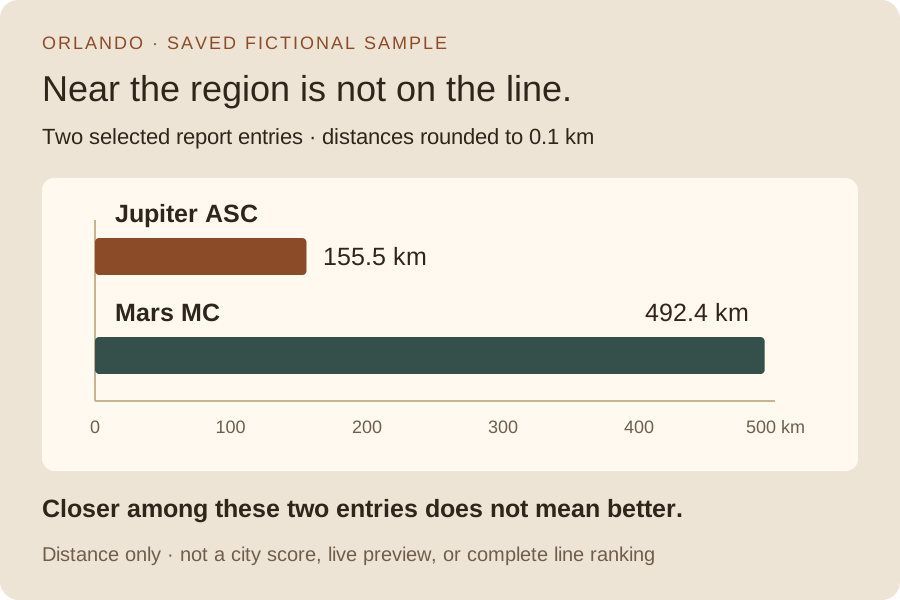
Saved fictional report measurements, rounded to one decimal place. Bar length represents distance only, not benefit, strength, or a city score.
When comparing astro lines, “closer” is a geographic statement. “Better for my purpose” requires interpretation and other evidence. A stronger interest in learning does not make the Jupiter measurement smaller, and a shorter distance does not establish that a particular opportunity exists.
Use astro lines to separate work demands from free time
The work event is the reason for the visit; the optional half-day is a separate choice. Jupiter ASC suggests a question about openness and confidence: would one unfamiliar activity make that free time worthwhile? The traveler could look for an experience that fits the available hours, rather than filling every gap. These astro lines do not locate an activity or promise that it will be enjoyable.
Mars MC brings public effort, ambition, and possible competitiveness into the discussion. For the work event, the traveler can check what participation actually requires: presenting, networking, or simply attending. Its greater distance in this sample remains relevant; a matching work theme does not make Mars closer or establish that it dominates the visit. The practical question is whether the event leaves enough time and energy for the extra activity.
In this fictional scenario, the outing remains optional: keep it if the schedule allows, or shorten it if work runs late. Neither choice changes the saved city-to-line distances.
The next map check is the destination itself, with other relevant accessible lines visible. Keep that result separate from the earlier line selection. These astro lines help frame questions about the visit; the event schedule, transport, and cost determine what is practical.
When the city result differs from the line you expected
The difference is often informative. Work through it before deciding that your astro lines are wrong or searching for a more reassuring interpretation.
Another line appears closer. Record both labels and their distances. The line that first caught your attention need not lead the city summary. For the Orlando example, only two report entries were selected; the page cannot tell you which signal will lead a different profile’s live result. Keep your original question, but allow the evidence to complicate the first impression.
A line disappears after filtering. Check the visible planet controls. Hiding astro lines changes what is displayed and can change the available location context; it does not erase the underlying calculation. Restore the relevant layers and repeat the same location selection before comparing results.
The city has no close visible line. That is a limited proximity finding, not a negative judgment about the place. The city may still meet practical needs. Do not change the birth time or move the selected point onto a line simply to obtain a more exciting answer. You would no longer be checking the original destination under the original information.
Several signals are nearby. Keep each planet and angle rather than merging them into one “lucky” or “difficult” label. Ordinary astro lines, angular aspect lines, and Paran signals are different evidence types. A crossing drawn on the map should not be used to invent an overall conclusion that the available result does not provide.
Some information is restricted. An unavailable preview or locked signal means you have not inspected it. It is not evidence of a favorable or unfavorable theme. The core map, location previews, city checks, and reports have different access scopes; follow the messages shown for the action you choose.
For questions about how distances are presented, use the line distance guide. Keep your astro lines attached to the location you actually checked; a distance alone cannot establish what you will experience there.
Keep a line-to-city record you can actually use
After exploring astro lines, your record should show the transition from visual interest to measured place evidence. For the fictional Orlando traveler, it could look like this:
Starting interest: I noticed Jupiter ASC near the region I want to visit. Place checked: The sample Orlando point, not a point selected directly on the line. Saved evidence: Jupiter ASC 155.5 km; Mars MC 492.4 km. What this establishes: Jupiter ASC is closer among these two entries, but Orlando is not directly on it. My question: Can I add half a day of exploration after the work event without overloading the trip? Next map check: Inspect other accessible signals at the same city location. Practical follow-up: Confirm whether the event schedule and transport leave time for the optional outing.
The traveler began with “Jupiter runs near Orlando.” They now have a more accurate statement: the sample city point is 155.5 km from Jupiter ASC, and other signals also need inspection. That correction supports a clearer visit question without turning proximity into a reason to book or cancel.
For your own astro lines, keep a line selection and a city check as separate entries. Record the location shown for each, then copy only its available labels and distances. If you later select the event venue or an outing location, inspect that point separately; do not attach the city’s measurements to it. Leave missing fields blank rather than borrowing values from the sample.
Choose the next action according to what is unresolved. An unclear symbol calls for the meanings reference. A different destination requires its own check. A broader question involving several places may justify comparing cities or consulting the Personal Report overview, with its separate scope and access requirements. More detail is useful when it answers the next question, not simply because it is available.
Find your astro lines and check your destination. Start with one line and one place, then preserve the distinction between what the map calculates, what the interpretation suggests, and what you still need to learn about life there.
Questions about your astro lines
Are astro lines the same as astrocartography lines?
In this context, yes: the shorter phrase refers to planetary lines on an astrocartography map. Each ordinary line combines a planet with an angle. It is different from a circular natal chart, although both use birth information.
Can I find my astro lines for free?
You can generate the core map without signing in. Available lines, place previews, city checks, and deeper analysis have their own limits or access requirements. Read the current result messages before assuming that every planetary layer or report is included.
Do astro lines change when I travel?
Travel does not change the original birth details. Selecting a new place changes the location you examine against that map. Correcting inaccurate birth information can change the calculation; panning or zooming simply changes the view.
Why do my astro lines look different from someone else’s?
They may have different birth dates, times, or places. Display settings and available layers can also differ. Confirm the input and complete labels before comparing maps, especially when the birth time is uncertain.
Must a city be directly on one of my astro lines?
No. A city query can describe nearby lines and their distances. Distance is context, not a guarantee, and an appealing theme does not require choosing the closest possible point. Keep practical suitability and the other available evidence in view.
Which astro lines should I inspect first?
Start with a recognizable planet-angle label and a real place you care about. Let your question guide the interpretation rather than assuming one planet is best for everyone. After identifying the line, inspect the city and other accessible signals before forming a broader conclusion.
Where do your astro lines run?
Generate your map, choose a line that interests you, and check the actual place you have in mind. Keep the line label and the city's evidence together.
Generate My Map